 Tel:
Tel:  Email:
  WhatsApp:
 Description
Key Technical Specifications
| Parameter | Specification |
|---|---|
| System Architecture | Mark VIeS (Simplex, Dual, or TMR) |
| Processor Type | 32-bit Industrial RISC |
| Scan Rate | 20 ms to 100 ms (Configurable) |
| Memory | 512 MB RAM, 2 GB Flash Storage |
| Communication Ports | 3x Ethernet (10/100/1000 Mbps), 2x Serial (RS-232/485) |
| Protocols Supported | Modbus TCP, EtherNet/IP, SNMP, SRTP |
| Operating Temperature | -30°C to +65°C (-22°F to +149°F) |
| Storage Temperature | -40°C to +85°C (-40°F to +185°F) |
| Relative Humidity | 5% to 95% (Non-condensing) |
| Power Input | 24 V DC (Nominal), Range 18–32 V DC |
| Power Consumption | 15 W (Typical), 25 W (Max) |
| Certification | CE, UL, CSA, ATEX (Zone 2 when housed) |
Product Introduction
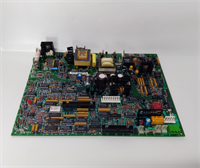
The IS220PTCCH2A is the central processing unit for GE’s Mark VIeS control system, specifically engineered for packaged gas and steam turbines. It executes safety-critical logic, manages combustion dynamics, and handles communications with plant DCS systems in a compact, ruggedized form factor.This revision (H2A) integrates enhanced Ethernet throughput, reducing network latency by approximately 15% compared to legacy PTCB models. Field logs show stable operation during voltage sags down to 18 V DC without logic resets. We verify every unit against a known-good firmware image before shipping to prevent boot-loop issues common in older stock.
 Installation & Configuration Guide
 Installation & Configuration Guide
Phase 1: Preparation (10 min)
- Confirm the system architecture (Simplex vs. TMR). TMR setups require three matched processors.
- Download the latest ToolboxST software and the specific project file (.APF) for your turbine.
- Critical: Document the IP address, subnet mask, and gateway settings from the old unit. A typo here isolates the controller from the HMI.
- Inspect the Ethernet ports on the new IS220PTCCH2A for bent pins or debris.
Phase 2: Removal (5–10 min)
- If possible, place the system in “Maintenance Mode” to bypass trip signals.
- Label all Ethernet cables (LAN A, LAN B, LAN C) and power leads before disconnecting.
- Remove the mounting screws securing the module to the DIN rail or chassis.
- Slide the module out gently. Avoid touching the exposed circuit traces.
Phase 3: Installation (10 min)
- Insert the new IS220PTCCH2A into the slot. Ensure the backplane connector engages fully.
- Secure the module with mounting screws. Torque to 12 in-lbs.
- Reconnect Ethernet cables to the correct ports. Mismatching LAN A and B breaks redundancy.
- Connect the 24 V DC power supply. Verify polarity (+/-) before tightening terminals.
Phase 4: Power-On & Test (10 min)
- Apply power. The “Status” LED should flash amber during boot, then turn solid green.
- Launch ToolboxST and attempt an online connection. Ping time should be <5 ms.
- Verify the firmware version matches the project requirements.
- Force a logic toggle via the software and observe the physical output response (if connected to I/O).
- Check the “Health” status in the diagnostics window for any communication errors.
Troubleshooting Quick Reference
| Symptom | Probability | Immediate Action |
|---|---|---|
| Status LED stays red | High (70%) | Firmware mismatch or corrupted boot image. Reload firmware via serial port. |
| Cannot connect via Ethernet | High (60%) | Check IP settings and cable integrity. Try a direct laptop connection to isolate network switches. |
| System trips on power-up | Medium (40%) | Verify 24 V DC supply stability. Ripple >5% can cause processor reset. |
| Intermittent comms loss | Medium (30%) | Inspect grounding. Poor chassis ground causes noise on Ethernet lines. |
| TMR disagreement alarm | Low (20%) | One processor is lagging. Check scan times; replace the slowest unit if consistent. |
Dimensions, Mounting & Wiring Notes
- Dimensions: Approx. 140 mm (H) x 110 mm (W) x 130 mm (D). Depth includes connector protrusion.
- Mounting: Standard 35 mm DIN rail or proprietary Mark VIeS chassis slot.
- Wiring: Use shielded Cat5e or Cat6 for Ethernet. Ground the shield at one end only.
- Power Terminals: Accept 12–16 AWG wire. Use ferrules for stranded wire to prevent fraying.
- Note: Keep serial cables away from high-voltage VFD outputs to prevent data corruption.

FAQ
Q1: Is the IS220PTCCH2A compatible with my old Mark VIe (non-S) system?
No. The “S” in Mark VIeS denotes a different architecture optimized for packaged units. While they look similar, the backplane pinout and firmware are incompatible. Trying to force it will damage the backplane. Stick to IS200 series for legacy Mark VIe.Q2: What condition is the unit in?
We sell “New Surplus” (unused, original box) and “Refurbished” (tested). Refurbished units undergo a full boot cycle, comms test, and thermal soak. Honestly, for a CPU, refurbished is often safer than old new stock because we verify the capacitors haven’t degraded on the shelf.Q3: I plugged it in and smelled ozone. Is that normal?
Absolutely not. That indicates a short circuit, likely from reversed power polarity or internal component failure. Cut power immediately. Do not re-energize. Send it back for analysis; forcing power will melt the board traces.Q4: Can I upgrade the firmware myself?
Yes, using GE’s ToolboxST software. However, you need the correct license key and the specific .APF project file. Don’t guess the version; loading v4.0 firmware on a v3.2 project will wipe your logic. Always backup first.Q5: How long does shipping take?
Domestic US orders arrive in 2 days. International shipments (DHL/FedEx) take 3–5 days to most major hubs. We pack these in anti-static bags with heavy bubble wrap; we’ve never had a DOA due to shipping damage.Q6: Do you support TMR configurations?
Yes. For TMR, we match three units with identical firmware revisions and date codes. Mismatched batches can cause synchronization faults during voting. Just specify “TMR Set” in your order notes.