
 Tel:
Tel:  Email:
  WhatsApp:
 Description
Key Technical Specifications
- Bus Standard: VME64x (P1 and P2 connectors populated)
- Processor Architecture: Embedded Real-Time Controller (Specific CPU core varies by firmware load)
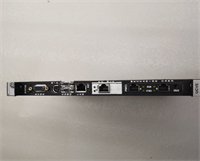
- Communication Ports: 2x RJ45 Ethernet (UDH/IDH networks), 1x RS-232 Service Port
- Input Voltage: +5V DC (via VME Backplane), +/-12V DC auxiliary rails
- Current Draw: Approx. 2.5A @ 5V DC (typical load, check backplane capacity)
- Operating Temperature: -30°C to +65°C (-22°F to +149°F)
- Storage Temperature: -40°C to +85°C
- Humidity Range: 5% to 95% Non-condensing
- Mounting: DIN Rail or VME Rack Mount (19-inch standard)
- Firmware: Loadable via ToolboxST software (Version dependent on project spec)
- LED Indicators: Run, Fault, Comm Active, Power Good (Discrete status bits)
- Certifications: UL, cUL, CE, Ex (Check specific nameplate for hazardous location rating)
Product Introduction
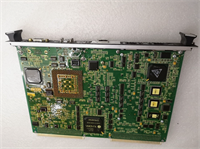
Walking into a control room where the Mark VIe system is blinking red usually means one thing: the VME backbone is choking. The IS215UCVEM10A isn’t just another circuit board; it’s the traffic cop for GE’s turbine logic. I’ve pulled these out of gas turbine enclosures in West Texas where the ambient heat alone should have melted the solder, and they kept ticking. That’s the baseline expectation. If you are running a Mark VIe simplex setup or need a bridge for your TMR voting logic, this is the hardware that holds the ring together.Engineers don’t pick this board because it looks pretty; they install it because it handles the deterministic timing required for turbine protection trips without flinching. We’re talking about scan times that need to stay under 20ms even when the network is flooded with diagnostic traffic. The dual Ethernet ports allow for segregated UDH (Unit Data Highway) and IDH (I/O Data Highway) traffic, which cuts collision rates significantly compared to older single-port designs. Just be warned: Revision A boards can be finicky if your rack grounding isn’t spot-on. I’ve seen “ghost” communication faults vanish just by re-terminating the shield drain wires.
Quality SOP & Tech Pitfalls (The Reality Check)
The Lab Report (SOP)
Before we ship a unit, it goes through the gauntlet. We don’t just plug it in and hope.
- Visual Inspection: Microscope check on the VME P1/P2 pins for bending or corrosion. Counterfeit markers (wrong font on chips, sloppy silk screen) get flagged immediately.
- Live Rack Test: Loaded into a verified Mark VIe test rack. We power up the backplane and monitor the 5V rail for ripple.
- Comms Verification: Connect via ToolboxST. Force a logic download and verify handshake times. Ping both Ethernet ports continuously for 30 minutes to check for packet drops.
- Multimeter Check: Using a Fluke 115, we verify isolation resistance between the chassis ground and the signal commons. Anything under 10 MΩ gets rejected.
- Sealing: Once passed, the board is bagged with desiccant and static shielding, not just thrown in a box.
The Engineer’s Warning (Pitfalls)
Here is where people lose money. The IS215UCVEM10A relies heavily on the firmware version matching the rest of your Mark VIe cluster. I once watched a plant sit dead for 14 hours because someone swapped in a “new” board with firmware Rev 4.2 into a system running Rev 3.9. The board powered up, LEDs looked green, but the voting logic timed out instantly. Always check the firmware revision against your project backup before installation.Also, stop ignoring the DIP switches. There’s a small bank of switches on the faceplate that sets the node ID and boot mode. I had a contractor replace a board, forget to copy the switch positions from the old unit, and the whole turbine tripped on “Loss of Communication.” He spent three hours troubleshooting the network cables before I walked over, looked at the switches, and flipped two tiny plastic tabs. Problem solved. Take a photo of the old board’s switch settings before you pull it.
Installation & Configuration Guide
Time Estimate: 30 Minutes (excluding logic download time)
- Pre-Installation Safety
- ⚠️ CRITICAL: Place the turbine control system in “Maintenance Mode” or perform a controlled shutdown. Do not hot-swap VME controllers in a TMR configuration unless the OEM manual explicitly states the rack supports it (most don’t without risking a vote mismatch).
- Discharge static from your body using a wrist strap grounded to the rack chassis.
- Take Photos: Snap clear pictures of the existing board’s DIP switches, jumpers, and cable routing.
- Removal
- Label every Ethernet cable and serial connector with tape. “Port 1” and “Port 2” look identical when you’re holding two loose cables.
- Release the ejector latches on the top and bottom of the card gently. Do not pry with a screwdriver; you will damage the VME guide rails.
- Slide the board out straight. If it sticks, check for a retaining screw you missed.
- Installation
- Copy Settings: Immediately set the DIP switches on the new IS215UCVEM10A to match your photos. This step prevents 90% of startup headaches.
- Align the board with the rack guides. Push firmly and evenly until the ejector latches click into place. Ensure the faceplate is flush with the rack front.
- Reconnect Ethernet and serial cables to their labeled ports.
- Power-On & Testing
- Restore power to the rack. Watch the LED sequence. You should see “Power Good” light first, followed by a flashing “Run” LED.
- Open ToolboxST on the engineering workstation. Attempt an online connection.
- Verify the “Fault” LED is off. If it flashes a specific pattern, count the blinks—that’s your error code.
- Download the latest logic project if the firmware versions differ slightly, then force a system reboot to ensure clean initialization.
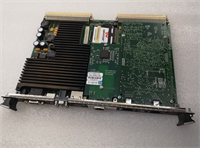
GE IS215UCVEM10A
Compatible Replacement Models
| Model Number | Compatibility Tier | Notes |
|---|---|---|
| IS215UCVEM10A | ✅ Drop-in Replacement | Exact match. Ensure revision level (A, B, etc.) matches system requirements. |
| IS215UCVEM10B | ✅ Drop-in Replacement | Updated revision. Usually backward compatible, but verify firmware load compatibility in ToolboxST. |
| IS215UCVEM11A | ⚠️ Software Compatible | Newer hardware architecture. Requires firmware update and potentially logic recompilation. Not a quick swap. |
| IS200UCVEH1A | ❌ Hardware Mod Required | Different form factor (Mark VI vs Mark VIe). Requires rack change and complete rewiring. Do not attempt as a direct swap. |
Frequently Asked Questions (FAQ)
Q: Can I hot-swap this board while the turbine is running?
A: Don’t bet your job on it. In a TMR (Triple Modular Redundant) setup, pulling the master controller might let the other two vote it out, but if the sync isn’t perfect, you risk a spurious trip. In a Simplex system, pulling this board kills the control logic instantly. Always plan for a shutdown or at least a full maintenance mode bypass.Q: My new board powers up but the “Comm” LED is red. What gives?
A: Nine times out of ten, your IP address or Node ID switches are wrong. The IS215UCVEM10A doesn’t auto-negotiate its identity like a home router. Check the DIP switches against the old board. If those match, your subnet mask in the ToolboxST project might not match the physical network config.Q: Is this board compatible with the older Mark VI system?
A: No. The Mark VI used different backplanes and card formats (like the UCVE cards were specific to VIe). The VME64x architecture on the IS215UCVEM10A won’t physically fit or electrically work in a Mark VI rack. Stick to the IS200 series for legacy Mark VI repairs.Q: How do I know if the firmware is too old?
A: Connect with ToolboxST. If the software throws a “Version Mismatch” warning during the online connect, you’re out of sync. You don’t necessarily need the newest firmware; you need the matching firmware that your logic project was compiled against. Check your project archive documentation.Q: Does this come with a warranty if it fails in six months?
A: If you buy it new surplus from a reputable supplier, you should get a minimum 1-year warranty. If you buy “as-is” from a broker, you own the risk. Given the cost of downtime on a turbine, I never buy critical control cards “as-is.” Pay the extra margin for the warranty coverage.




