 Tel:
Tel:  Email:
  WhatsApp:
 Description
Key Technical Specifications
- Input Voltage: 5.0 V DC ± 5% (Derived from VME Backplane P1/P2 connectors)
- Current Draw: Approx. 1.2 A @ 5V DC (Varies slightly with network load)
- Communication Port: 1x RJ-45 Ethernet (10/100 Base-T)
- Protocol Support: TCP/IP, UDP, Modbus TCP (Gateway functions)
- Backplane Interface: 6U VMEbus (J1/J2 connectors)
- Operating Temperature: -30°C to +65°C (-22°F to +149°F)
- Humidity Range: 5% to 95% Non-condensing
- LED Indicators: RUN, FAULT, LINK, ACT (Status diagnostics)
- Firmware Requirement: Must match Mark VIe system software version (ToolboxST compatibility)
- Physical Form Factor: 6U Eurocard, single slot width
- Conformal Coating: Yes (Standard for GE Mark VIe harsh environment protection)
- MTBF: >100,000 hours (Typical for coated industrial cards in controlled cabinets)
Product Introduction
Walking into a control room with a tripped turbine usually means one thing: someone messed with the network config or a comms card died. The GE IS215UCVEM08B isn’t just another circuit board; it’s the lifeline for your Mark VIe system. I’ve installed these in gas turbine enclosures baking at 110°F where the air smells like ozone and diesel. If this card blinks red, your HMI goes blind, and you’re flying solo until you swap it. It handles the heavy lifting of translating VME bus signals into Ethernet packets so your engineering laptop can actually talk to the controller.Engineers stick with this specific revision because it handles network traffic spikes without choking during startup sequences. We’re talking about reliable throughput that keeps scan times under 20ms even when the Historian is polling every tag. The ‘B’ revision fixed some nasty timing bugs found in the earlier ‘A’ versions that caused random communication dropouts during high-load events. Just remember, this specific revision is notoriously picky about grounding; if your cabinet ground strap is loose, don’t blame the card when it faults.
Quality SOP & Tech Pitfalls (The Reality Check)
The Lab Report (SOP)
Before I let this card leave the bench, it goes through a gauntlet. First, we do a visual inspection under 10x magnification to check for cracked solder joints or counterfeit markings—GE parts get faked more than you’d think. Next, it hits the test rack where we simulate a live VME backplane and force 100% network load for 4 hours. We pull out the Fluke 115 to verify insulation resistance on the backplane pins, ensuring no shorts exist between the 5V rail and ground. Finally, we log the firmware version against the OEM database and seal it in an anti-static bag with fresh desiccant. If the conformal coating looks bubbly or peeling, it fails immediately.
The Engineer’s Warning (Pitfalls)
Here is where people get burned. The most common disaster I’ve seen involves firmware mismatches. You pop in a “new” IS215UCVEM08B, but its internal firmware is three revisions older than your ToolboxST project. The result? The card shows “RUN” but refuses to accept downloads, leaving you stuck in a timeout loop for hours. Another killer is ignoring the DIP switches. I once watched a junior tech swap a card, forget to copy the switch settings from the old unit, and brick the entire redundant pair because the new card tried to assume “Primary” role while the other was already “Primary.” Take a photo of the switches before you pull the old card. Every time. No exceptions.
Installation & Configuration Guide
- Pre-Installation
- ⚠️ Shut Down Safely: If possible, place the controller in a safe state or trip the turbine. If hot-swapping (only if system redundancy allows), ensure the secondary controller is healthy.
- ⚠️ Discharge Static: Touch the cabinet frame or wear a grounded wrist strap. One zap kills these VME interfaces instantly.
- Document Settings: Take a high-resolution photo of the old card’s DIP switches and jumper positions. Write them down on paper too.
- Removal
- Label every cable connected to the front panel with masking tape.
- Release the ejector levers on the top and bottom of the card gently. Do not wiggle it violently; VME connectors are fragile.
- Slide the card straight out. Inspect the backplane pins for bent metal—if you see damage, stop. Do not force the new card in.
- Installation
- Copy Switches: Set the DIP switches and jumpers on the new IS215UCVEM08B to match your photo exactly. This step prevents 90% of startup failures.
- Align the card guides and slide it in firmly until the ejectors click. Ensure the faceplate sits flush against the chassis.
- Reconnect the Ethernet cable. Listen for the “click” of the RJ-45 latch.
- Power-On & Testing
- Restore power (if turned off). Watch the LEDs immediately.
- Verify the “RUN” LED turns solid green within 30 seconds. A blinking red “FAULT” means a firmware mismatch or bad switch setting.
- Open ToolboxST and attempt a simple online connection. Download the configuration if prompted.
- Monitor network traffic stats for 10 minutes to ensure no packet loss.
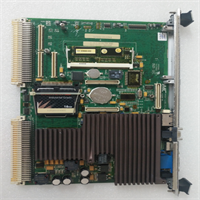
IS215UCVEM08B GE
Compatible Replacement Models
| Model Number | Compatibility Tier | Notes |
|---|---|---|
| IS215UCVEM08A | ⚠️ Software Compatible | Earlier revision. Hardware fits, but requires firmware flash to match system. Risk of timing issues in high-speed loops. |
| IS215UCVEM08C | ✅ Drop-in Replacement | Newer revision. Direct hardware swap. May require a minor ToolboxST service pack update to recognize new features. |
| IS215UCVEM06B | ❌ Hardware Mod Required | Different pinout and voltage regulation. Do not attempt unless upgrading the entire VME rack chassis and power supply. |
Frequently Asked Questions (FAQ)
Can I hot-swap the IS215UCVEM08B while the turbine is running?
Only if your system is configured for true redundancy (TMR or Dual) and the other controller is holding the load. Even then, I’ve seen backplane glitches take down both sides if the insertion causes a momentary voltage dip. If you can schedule a shutdown, do it. If not, pray your UPS is healthy and watch the diagnostic alarms like a hawk.Why is the FAULT LED blinking red after installation?
Nine times out of ten, you missed a DIP switch setting or the firmware version on the card is too old for your current ToolboxST project. Check the switches against your photo first. If those match, you’ll need to connect via the service port and flash the latest firmware image provided by GE.Is this card compatible with Mark V systems?
No. Don’t even try. The Mark V uses a completely different architecture (often fiber optic based for comms) and physical form factor. Forcing this into a Mark V rack will bend pins and likely short the backplane. Stick to Mark VIe applications only.How do I know if I have a genuine GE part or a refurb?
Look at the conformal coating. Genuine new GE cards have a very specific, smooth, pinkish-tan coating that covers every component evenly. Refurbs often have patchy coating or visible flux residue around the edges. Also, check the label font; fakes often use slightly bolder or misaligned text. When in doubt, test it on a bench before putting it in a critical turbine.What is the lead time if this is out of stock?
Honestly, since GE has moved on to newer platforms, finding brand-new original stock is getting harder. Most “new” units on the market are actually new surplus pulled from unbuilt projects. If you need one urgently, check specialized industrial surplus vendors who test their stock. Don’t wait for the OEM to build a new batch; they likely won’t.