 Tel:
Tel:  Email:
  WhatsApp:
 Description
Key Technical Specifications
| Parameter | Specification |
|---|---|
| Processor Architecture | 32-bit RISC (Enhanced PowerPC) |
| Memory (RAM) | 256 MB SDRAM (ECC protected) |
| Flash Memory | 128 MB Non-volatile storage |
| Bus Interface | VME64x (2eVME capable) |
| Communication Ports | 3x Ethernet (10/100/1000 Base-T), 1x RS-232 Serial |
| Redundancy Protocol | Supports Parallel Redundancy Protocol (PRP) |
| Watchdog Timer | Hardware enforced, non-maskable |
| Operating Temperature | -30°C to +70°C (-22°F to 158°F) |
| Humidity Range | 5% to 95% non-condensing |
| Power Consumption | Typical 15W @ 5V DC |
| Mounting | 6U VME Form Factor |
| Firmware Platform | Speedtronic Mark VIe OS (v4.0+) |
| Certifications | UL, cUL, CE, ATEX Zone 2 (with specific config) |
Product Introduction
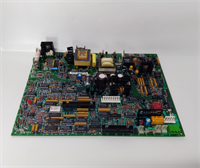
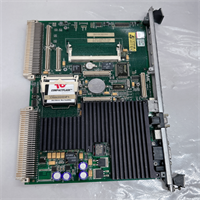
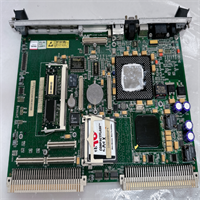
Nothing kills a shift faster than a controller that can’t keep up with modern I/O scan rates. The GE IS215UCVEH2AB is the heavy hitter in the Mark VIe lineup, designed specifically for plants that pushed the older ’06’ series to its limits. I’ve seen these installed in combined cycle units where the logic complexity choked previous generations, and the H2 revision handles the load without breaking a sweat. It’s not just a replacement; it’s an upgrade path for systems that need tighter determinism and more memory headroom.
The real value here is the expanded memory and the gigabit Ethernet capability. You get 256 MB of RAM, which lets you run complex protection algorithms alongside extensive data logging without swapping to flash. The support for PRP (Parallel Redundancy Protocol) on the network ports means zero recovery time if a switch fails—a feature that paid for itself instantly at a petrochemical plant in Louisiana during a storm last year. One caveat: this ‘H2’ revision runs hotter than the old models. If your control cabinet cooling fans are sluggish, expect thermal throttling. Check your airflow before you bolt this in.
Quality SOP & Tech Pitfalls (The Reality Check)
The Lab Report (SOP)
We treat the H2 revision with extra scrutiny because of its higher density components. Our protocol is strict:
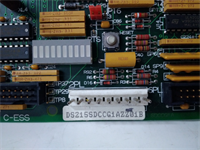
- Visual/Counterfeit Check: Inspect under 10x magnification. We look for re-ballled BGAs and verify the GE holographic security label. The market is flooded with fake “refurbished” H2 boards.
- Live Test on Test Rack: Installed in a calibrated Mark VIe VME chassis. We run the full
UCVEdiagnostic suite for 6 hours, stressing the Ethernet ports with packet floods. - Insulation Resistance/Multimeter Checks: Using a Fluke 87V, we verify the 5V DC rail stability under load and check for leakage on the VME bus lines.
- Firmware Version Logging: We record the bootloader and OS versions. The H2 often ships with newer firmware that might conflict with older Toolbox ST projects.
- Anti-static Sealing: Placed in a static-shielded bag with humidity indicator cards, then double-boxed.
The Engineer’s Warning (Pitfalls)
The biggest trap with the IS215UCVEH2AB is firmware incompatibility. This board often comes with Mark VIe OS v4.x or higher. If your existing I/O packs (like DVME or TREG) are running old firmware, the H2 controller might refuse to communicate, throwing “Node Timeout” errors across the rack. I once saw a plant down for 18 hours because they swapped in an H2 without checking the compatibility matrix first. You might need to flash down the controller or upgrade all I/O packs.
Second, thermal management. The H2 runs significantly warmer than the UCVEH1 or UCVE06. If your cabinet filters are clogged with dust (and they usually are), this card will hit its thermal limit and shut down. Don’t just swap the card; clean the fans and replace the filters. Ignoring this turns a simple swap into a recurring nuisance trip.
Installation & Configuration Guide
Time estimate: 45 minutes. Do not skip steps.
-
Pre-Installation
- ⚠️ SHUT DOWN POWER. Cut 24V DC and 125V DC to the rack. Wait at least 45 seconds for capacitor discharge.
- ⚠️ PHOTO EVERYTHING. Take clear photos of the DIP switches, jumpers, and fiber/copper cable routing on the failed card. The H2 defaults are rarely correct for existing fields.
- Ground yourself properly. Attach your anti-static wrist strap to bare metal on the chassis.
-
Removal
- Label every cable (Ethernet 1, 2, 3, Serial). Use permanent markers on tape; pencil fades in oil mist.
- Release the ejector levers at the top and bottom. Wiggle gently to break the seal, then pull straight out.
- Inspect the backplane connector for bent pins. If you see any, stop. Do not force the new card in.
-
Installation
- COPY DIP/JUMPER SETTINGS. This is critical. Match the failed card’s configuration exactly on the new IS215UCVEH2AB. A single switch in the wrong position can disable redundancy or change the IP boot mode.
- Align the card guides carefully. Slide the module in until the rear connector seats firmly. You should feel a solid click.
- Lock the ejector levers. Ensure they are flush with the faceplate; if they stick out, the card isn’t seated.
-
Power-On & Testing
- Re-apply power. Watch the LED sequence closely.
- LED Sequence: The
RUNLED should blink green rapidly, then go solid. TheFAULTLED must remain off. IfFAULTglows red, check your DIP switches immediately. - Connect your engineering laptop directly to the service port. Open GE Toolbox ST.
- Verify the controller version. If prompted for a firmware mismatch, do not proceed without consulting the project lead.
- Download the logic project. Monitor the I/O scan times; they should be lower than the old card. If scan times spike, check for network collisions on the new gigabit ports.
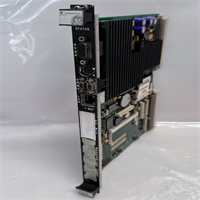
IS215UCVEH2AB GE
Compatible Replacement Models
| Compatibility Tier | Model Number | Notes & Differences |
|---|---|---|
| ✅ Drop-in Replacement | IS215UCVEH2AB | Exact match. Best performance. Ensure firmware aligns with project. |
| ⚠️ Software Compatible | IS215UCVEH1A | Older H1 revision. Will work physically, but lacks the extra RAM and gigabit speed. May bottleneck complex logic. No firmware flash needed usually. |
| ❌ Hardware Mod Required | IS215UCVEM06A | Different form factor/memory map. Cannot be used as a direct swap without major logic rewrites and potentially chassis changes. Avoid. |
Frequently Asked Questions (FAQ)
Q: Can I hot-swap the IS215UCVEH2AB in a TMR system?
A: Yes, but with massive caveats. In a Triple Modular Redundant (TMR) setup, you can pull one controller while the other two hold the vote. However, the system will be in “Degraded Mode.” If another fault occurs during the swap, the turbine trips. Only do this if you have a second engineer monitoring the remaining racks, and never during a transient load condition.
A: Yes, but with massive caveats. In a Triple Modular Redundant (TMR) setup, you can pull one controller while the other two hold the vote. However, the system will be in “Degraded Mode.” If another fault occurs during the swap, the turbine trips. Only do this if you have a second engineer monitoring the remaining racks, and never during a transient load condition.
Q: The card powers up, but Toolbox ST won’t connect via Ethernet. Why?
A: The H2 revision often defaults to a different IP address subnet or has PRP enabled by default, which confuses standard laptops. Check the DIP switches for the “Static IP” vs “DHCP” setting. Also, ensure your laptop’s firewall isn’t blocking the specific ports GE Toolbox uses (usually UDP/TCP 5000+). Try the serial port first to diagnose the network config.
A: The H2 revision often defaults to a different IP address subnet or has PRP enabled by default, which confuses standard laptops. Check the DIP switches for the “Static IP” vs “DHCP” setting. Also, ensure your laptop’s firewall isn’t blocking the specific ports GE Toolbox uses (usually UDP/TCP 5000+). Try the serial port first to diagnose the network config.
Q: Is this card backward compatible with Mark VI (non-e) systems?
A: No. The Mark VIe architecture is fundamentally different from the original Mark VI. The backplane pinouts and communication protocols are incompatible. Forcing this card into a Mark VI rack will damage both the card and the chassis. Use IS200 series cards for legacy Mark VI.
A: No. The Mark VIe architecture is fundamentally different from the original Mark VI. The backplane pinouts and communication protocols are incompatible. Forcing this card into a Mark VI rack will damage both the card and the chassis. Use IS200 series cards for legacy Mark VI.
Q: How much longer does the firmware download take compared to the old model?
A: Actually, it’s faster. The gigabit Ethernet ports on the H2 allow for much quicker project downloads. Expect a 30-40% reduction in download time compared to the 10/100 Mbps older models, provided your laptop and switch also support gigabit speeds.
A: Actually, it’s faster. The gigabit Ethernet ports on the H2 allow for much quicker project downloads. Expect a 30-40% reduction in download time compared to the 10/100 Mbps older models, provided your laptop and switch also support gigabit speeds.
Q: What does the “AB” suffix mean in IS215UCVEH2AB?
A: It indicates a specific manufacturing revision or component supplier change approved by GE. Functionally, it is identical to the base H2 model. However, always verify the firmware version included on “AB” revisions, as they sometimes ship with a newer bootloader that requires a specific version of Toolbox ST to recognize. Check the GE documentation for your specific software version compatibility.
A: It indicates a specific manufacturing revision or component supplier change approved by GE. Functionally, it is identical to the base H2 model. However, always verify the firmware version included on “AB” revisions, as they sometimes ship with a newer bootloader that requires a specific version of Toolbox ST to recognize. Check the GE documentation for your specific software version compatibility.