 Tel:
Tel:  Email:
  WhatsApp:
 Description
Key Technical Specifications
| Parameter | Specification |
|---|---|
| Manufacturer | General Electric (GE) |
| Part Number | IS200PMCIH1ABA |
| System Series | Speedtronic Mark VIe |
| Function | Primary Master Control Interface (PMCI) |
| Communication Ports | Dual 10/100 Mbps Ethernet (RJ45) |
| Protocol Support | Modbus TCP, EGD (Ethernet Global Data), SRTP |
| Redundancy | Supports TMR (Triple Modular Redundant) configurations |
| Input Voltage | 24 VDC nominal (via backplane) |
| Operating Temp | -30°C to +65°C (-22°F to +149°F) |
| Humidity | 5% to 95% non-condensing |
| Mounting | DIN Rail or Mark VIe Backplane |
| Firmware | Version dependent on system build (Check GEH-6721) |
Product Introduction
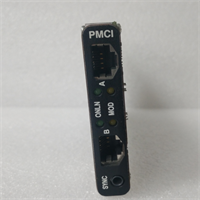
You don’t install a PMCI board because you want to; you install it because the turbine is blind without it. The IS200PMCIH1ABA is the nervous system hub for GE’s Mark VIe control platform, sitting right between your heavy-duty turbine logic and the plant’s DCS or SCADA network. I’ve pulled these out of racks baking in 110°F Texas heat and others from damp offshore platforms. They take a beating, but when the Ethernet link drops, the operator sees nothing. That’s when the phone starts ringing.Engineers stick with this specific revision because it handles the packet load without choking during startup transients. It pushes data at full 100 Mbps speeds with latency low enough to keep protection trips accurate. Don’t let the plastic casing fool you; the internal shielding is decent, but I’ve seen units fail because someone ignored the grounding strap. This specific revision is notoriously picky about cable quality—use Cat5e shielded or better, or expect intermittent dropouts that will drive you insane.
Quality SOP & Tech Pitfalls (The Reality Check)
The Lab Report (SOP)
Before we ship a unit, my team runs a gauntlet that mimics a bad Tuesday on the floor.
- Visual Inspection: We check for burnt pins, cracked solder joints on the RJ45 ports, and counterfeit stickers under a microscope.
- Live Rack Test: The board goes into a powered Mark VIe test bench. We flood the ports with EGD packets to verify throughput doesn’t dip below 98%.
- Electrical Verification: Using a Fluke 115, we probe the backplane pins for correct 24V DC continuity and check insulation resistance.
- Firmware Logging: We dump the current firmware version and compare it against the GEH-6721 manual baseline.
- Sealing: Immediate anti-static bagging with desiccant. No exceptions.
The Engineer’s Warning (Pitfalls)
Here is where people get burned. The biggest mistake? Ignoring the DIP switches. The IS200PMCIH1ABA uses hardware switches to set node IDs and termination resistors. I once watched a junior tech swap a board, power up, and watch the whole turbine trip because he didn’t copy the switch settings from the old card. The new card defaulted to “off,” causing a network collision.Another disaster zone is firmware mismatch. If your system is running an older Mark VIe build and you slap in a PMCI with newer silicon, it might handshake but timeout during critical data bursts. Always check the firmware revision against your system’s GED file before installation. Don’t guess.
Installation & Configuration Guide
Time Estimate: 30 Minutes (if you don’t lose the screws)
- Pre-Installation ⚠️
- Shut down the turbine control power. Wait at least 5 minutes for capacitors to discharge.
- CRITICAL: Take a high-resolution photo of the existing PMCI board, specifically focusing on the DIP switches and jumper positions. One wrong switch setting means no comms.
- Label every Ethernet cable. “Port A” and “Port B” matter for redundancy.
- Removal
- Disconnect the Ethernet cables gently; do not yank on the cord, pull the connector head.
- Release the DIN rail clip or unscrew the mounting brackets.
- Slide the module out. If it sticks, check for a hidden retaining screw.
- Installation
- Copy Settings: Before inserting the new IS200PMCIH1ABA, set the DIP switches and jumpers to match your photo exactly. This prevents 90% of startup failures.
- Seat the module firmly onto the backplane connectors. You should feel a solid click.
- Secure the mounting clips or screws. Loose modules vibrate loose during operation.
- Power-On & Testing
- Reconnect Ethernet cables to the correct ports.
- Restore 24V DC power.
- Watch the LEDs. The “OK” light should turn green steady. The “LAN” lights should flicker rapidly indicating traffic.
- Log into the engineering workstation and verify communication status. Download the latest logic if prompted by the system builder.
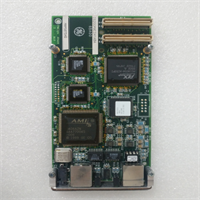
IS200PMCIH1ABA GE
Compatible Replacement Models
| Compatibility Tier | Model Number | Notes |
|---|---|---|
| ✅ Drop-in Replacement | IS200PMCIH1ABA | Exact match. Ensure firmware revision aligns with your system build. |
| ⚠️ Software Compatible | IS200PMCIH1ABB | Newer revision. Hardware fits, but requires firmware update and potential logic recompile. Expect 2-4 hours of engineering labor. |
| ❌ Hardware Mod Required | IS210PMCIH1A | Different form factor or voltage requirements. Do not attempt unless upgrading the entire rack chassis. |
Frequently Asked Questions (FAQ)
Can I hot-swap the IS200PMCIH1ABA while the turbine is running?
No. While some Mark VIe I/O modules support hot-swapping, the Primary Master Control Interface is the network brain. Pulling it kills communication to the HMI and often triggers a protective trip. Plan a shutdown.My new board powers up, but the “LAN” LED is off. What gives?
9 times out of 10, it’s the cable or the switch setting. Check that you are using shielded Cat5e and that the DIP switches for termination are set correctly for your network topology. Also, verify the switch port on the router isn’t disabled.Is this board compatible with Mark V systems?
Absolutely not. The Mark V and Mark VIe architectures are completely different. The connectors won’t even line up, and the protocol stack is incompatible. Don’t force it.How do I know if the firmware is too new for my system?
Check the system’s .GED file version in your engineering toolbox. If the PMCI firmware date is significantly newer than the rest of your rack components, you risk timing mismatches. When in doubt, ask your GE rep to flash it to the matching version before shipping.What does it mean if the “FAIL” LED flashes red twice?
That usually indicates a hardware self-test failure, often related to the Ethernet PHY chip or memory corruption. If a power cycle doesn’t clear it, the board is likely dead on arrival or damaged by a surge. Swap it out immediately.
向千问提问