 Tel:
Tel:  Email:
  WhatsApp:
 Description
Key Technical Specifications
- Communication Protocol: IEEE 802.3 Ethernet (10/100 Base-T)
- Data Rate: 100 Mbps (Fixed High-Speed Link)
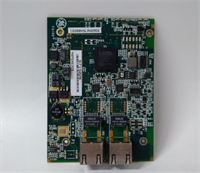
- Connector Type: Dual RJ45 Ports (Primary & Secondary for redundancy)
- Backplane Interface: 37-pin DIN connector (Mark VIe standard)
- Operating Temperature: -30°C to +65°C (-22°F to +149°F)
- Storage Temperature: -40°C to +85°C
- Relative Humidity: 5% to 95% (Non-condensing)
- Power Consumption: Approx. 1.5 Watts @ 5V DC logic supply
- LED Indicators: Link Status, Activity, Fault, Power OK
- Firmware Compatibility: Mark VIe Speedtronic Firmware Rev 3.0+
- Compliance: CE, UL Listed for Industrial Control Equipment
- Mounting: DIN Rail or Panel Mount via Mark VIe Chassis
Product Introduction
Walking into a gas turbine control room in July, heat radiating off the cabinets, is where cheap comms cards die. The IS200HSLAH2ADE isn’t some office-grade switch; it’s the backbone of the Mark VIe architecture, designed to keep data flowing between the primary controller and remote I/O when vibration and temperature would fry a standard commercial unit. I’ve pulled these out of frames that have seen ten years of continuous operation near exhaust turbines, and they still handshake perfectly.Engineers stick with this specific revision because it locks down the latency jitter to under 1ms during peak load transients. That stability matters when you’re synchronizing fuel valves across a distributed network. It’s not flashy. The casing is thick metal, the ports are shielded, and it ignores electrical noise that trips lesser hardware. Just note: Revision ‘E’ (the ‘E’ at the end of the model number) has a specific bootloader sequence. If you try to swap it with an older ‘A’ or ‘B’ revision without checking the firmware map, the controller will flag a mismatch and trip the unit.
Quality SOP & Tech Pitfalls (The Reality Check)
The Lab Report (SOP)
Before we ship an IS200HSLAH2ADE, it goes through a brutal checkout.
- Visual Inspection: We check for bent pins on the 37-pin backplane connector and verify the GE holographic serial label isn’t peeling (a common sign of refurbed junk).
- Live Rack Test: The card gets seated in a powered Mark VIe test chassis. We ping both RJ45 ports continuously for 4 hours while cycling the ambient temp from 20°C to 60°C.
- Electrical Verification: Using a Fluke 115, we verify the 5V DC logic input tolerance is within ±2%. Any drift over 4.9V or under 5.1V gets rejected.
- Firmware Log: We dump the onboard EPROM version and cross-reference it with the GE GFK-2314 manual requirements.
- Sealing: Once passed, it’s bagged in anti-static Mylar with desiccant, not just thrown in a box.
The Engineer’s Warning (Pitfalls)
Don’t ignore the DIP switches. I once watched a plant stay down for six hours because a technician swapped an HSLA card and assumed the settings were automatic. They weren’t. The old card had a specific node address set via hard jumpers that the new one didn’t match. The controller saw “ghost” traffic and initiated a safety shutdown.
Also, watch out for electrostatic discharge (ESD). These high-speed Ethernet chips are sensitive. If you touch the RJ45 magnetics without a wrist strap in a dry environment, you might fry the PHY layer. The card will light up “Power OK,” but the link LED will never turn green. You’ll chase that ghost for days.
Installation & Configuration Guide
Time estimate: 30 minutes (if you don’t panic).
- Pre-Installation
- ⚠️ SHUTDOWN REQUIRED: Do not hot-swap this card in a running redundant pair unless you are 100% certified on Mark VIe online replacement procedures. One wrong move drops the network.
- Discharge static. Touch the chassis frame before handling the card.
- Take Photos: Snap a clear picture of the existing DIP switches and jumper blocks on the failing card. This is your lifeline.
- Removal
- Label every cable connected to the RJ45 ports (Port A vs. Port B).
- Release the DIN rail locking clips gently. Don’t pry with a screwdriver; you’ll crack the plastic housing.
- Pull the card straight out. If it sticks, check for a hidden retention screw.
- Installation
- Copy Settings: Before seating the new IS200HSLAH2ADE, replicate the DIP switch and jumper positions exactly as photographed. This step prevents 90% of startup failures.
- Align the 37-pin connector carefully. Push firmly until the backplane seats flush.
- Engage the locking clips until they click.
- Power-On & Testing
- Restore power. Watch the LED sequence.
- Green “OK” LED: Should be steady.
- Link LEDs: Should flash amber/green within 10 seconds of boot.
- Connect a laptop to the service port and verify the controller recognizes the module ID. Download the latest configuration if prompted.
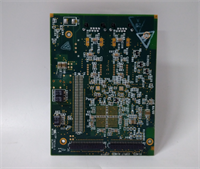
IS200HSLAH2ADE GE
Compatible Replacement Models
| Model Number | Compatibility Tier | Notes |
|---|---|---|
| IS200HSLAH2ADE | ✅ Drop-in Replacement | Exact match. Ensure firmware revision matches system requirement. |
| IS200HSLAH1ADB | ⚠️ Software Compatible | Older revision. Hardware fits, but requires firmware downgrade or logic recompile. Not recommended for mixed fleets. |
| IS200HSLAH2ADF | ✅ Drop-in Replacement | Newer revision. Generally backward compatible, but verify with GE field service bulletin prior to install. |
| Third-Party Clones | ❌ Hardware Mod Required | Avoid. Pinouts often differ slightly, causing backplane damage. Stick to OEM. |
Frequently Asked Questions (FAQ)
Can I hot-swap this card while the turbine is running?
Technically, the Mark VIe supports online replacement for redundant HSLA modules. However, I wouldn’t risk it unless you have a second engineer watching the diagnostics screen. If the network splits during the swap, the turbine trips. If you must do it, ensure the partner card is healthy and carrying the full load first.Why is the “Link” LED flashing amber instead of solid green?
Usually means a speed mismatch or a bad cable. This card forces 100 Mbps Full-Duplex. If your switch is set to auto-negotiate and falls back to 10 Mbps, the link won’t stabilize. Force the switch port to 100/Full. Also, check your Cat5e cables; industrial vibration loosens the crimps inside the RJ45 heads.Is the “E” revision significantly different from the “A” revision?
Yes. The ‘E’ revision updated the Ethernet PHY chip to handle higher noise immunity. GE stopped supporting the ‘A’ and ‘B’ revisions in newer firmware loads. If your system is running Mark VIe Simplicity UI version 4.0+, you likely need the ‘E’ or later. Check your GFK manual.What if the card fails the self-test immediately after installation?
9 times out of 10, it’s the DIP switches. Did you copy the node address correctly? If the address conflicts with another card on the backplane, the self-test fails instantly. Double-check your photos. If settings are correct, the backplane slot itself might be dirty—try a different slot if the chassis allows.Does this come with a warranty?
We provide a 1-year replacement warranty. If it dies due to manufacturing defects, we swap it. But if you blow it up because you hooked up 120V AC to the 5V DC logic pins, that’s on you. Read the pinout diagram before energizing.