
 Tel:
Tel:  Email:
  WhatsApp:
 Description
Key Technical Specifications
- Processor Architecture: Embedded ARM-based Real-Time Processor
- Memory: 256 MB DDR SDRAM, 128 MB Flash Storage
- Communication Ports: 2x RJ45 10/100 Base-TX Ethernet (Isolated)
- Supported Protocols: Modbus TCP/IP (Server/Client), DNP3, SNMP, OPC DA, UGATE
- Data Throughput: Up to 10,000 registers per second update rate
- Operating Temperature: -30°C to +65°C (-22°F to +149°F)
- Storage Temperature: -40°C to +85°C
- Relative Humidity: 5% to 95% (Non-condensing)
- Power Consumption: Approx. 3.5 Watts @ 5V DC logic supply
- LED Indicators: Run, Fault, LAN1 Activity, LAN2 Activity, Power OK
- Backplane Interface: 37-pin DIN connector (Mark VIe standard)
- Compliance: CE, UL Listed, IEC 61000-4 EMC Immunity
Product Introduction
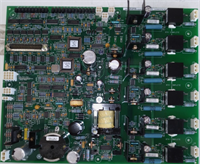
If your control room operator can’t see turbine data on their HMI, it’s usually because this card choked. The IS200EGPAG1BCA is the translator between the high-speed, deterministic world of the Mark VIe controller and the messy, congested plant network where IT guys run everything. I’ve seen plants lose hours of production data because they tried to use a generic PC-based gateway that couldn’t handle the electrical noise near the turbine hall. This GE unit sits in the slot and takes the beating without dropping a packet.The real value here is the deterministic update rate. While standard gateways might lag during network storms, the EGP prioritizes critical alarm and trip data, ensuring the DCS sees a “Trip” signal within 50ms even if the network is flooded with historical logging traffic. It’s not the fastest processor on the market by raw clock speed, but its firmware is tuned specifically for turbine control latency. One heads-up: The ‘B’ revision hardware with ‘CA’ suffix has a specific bootloader that is sensitive to IP address conflicts during boot. If you plug it into a live network with a duplicate IP before configuring it offline, it can lock up the port until a hard power cycle.
Quality SOP & Tech Pitfalls (The Reality Check)
The Lab Report (SOP)
We treat communication cards differently than I/O. A visual check isn’t enough.
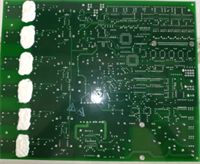
- Physical Inspection: Verify the RJ45 magnetics are intact (no crushed ports) and the 37-pin backplane connector is clean. Check for the GE holographic label.
- Boot & Firmware Check: We seat the card in a test chassis and monitor the serial console output. We verify the firmware version matches the GE GFK-2485 compatibility matrix.
- Throughput Stress Test: We connect two laptops to the dual Ethernet ports and flood the card with Modbus requests while simultaneously pulling data from the backplane simulator. We look for dropped packets or latency spikes over 100ms.
- Protocol Validation: We test a live Modbus TCP session reading 500 holding registers to ensure data integrity matches the source.
- Thermal Soak: Run at full comms load for 2 hours at 50°C ambient. No thermal throttling allowed.
The Engineer’s Warning (Pitfalls)
Don’t skip the IP configuration step. The biggest disaster I witnessed involved a technician swapping an EGP card, assuming it would “just pick up” the old IP from the controller logic. It doesn’t. The IP address is stored in the EGP’s non-volatile memory, not the CPU. If you install a fresh card with the default IP (often 192.168.1.10 or similar), it conflicts with the network or simply doesn’t talk to the HMI. The plant sat blind for 4 hours because nobody checked the DIP switches or used the provisioning tool to set the IP before bolting the door shut.
Also, watch out for “Ground Loops” on the Ethernet shield. If your switch ground and the turbine ground differ by more than a volt, you’ll get intermittent link drops. Use shielded Cat5e with the shield grounded at one end only (usually the switch side), or install an industrial Ethernet isolator if the problem persists.
Installation & Configuration Guide
Time estimate: 45 minutes (includes config time).
- Pre-Installation
- ⚠️ SAFETY FIRST: While the EGP can technically be hot-swapped in a redundant system, I recommend a controlled shutdown of the communications network to prevent HMI alarms from flooding the operator.
- Discharge static. These Ethernet PHY chips are sensitive to ESD.
- Document Settings: If the old card is still partially functional, try to read its IP configuration via the toolbox software. If dead, find the original commissioning sheet. Do not guess the IP.
- Removal
- Label the Ethernet cables (LAN1 vs. LAN2). Swapping them can break redundancy schemes.
- Release the DIN rail clip carefully.
- Pull the card straight out.
- Installation
- Provisioning: Before inserting the new IS200EGPAG1BCA, use the GE Toolbox software on a laptop to connect to the card (benchtop) and program the correct IP Address, Subnet Mask, and Gateway. This prevents network conflicts.
- Seat the card on the backplane and lock the DIN clip.
- Reconnect Ethernet cables to the correct ports.
- Power-On & Testing
- Observe the LED sequence. “Run” should blink, then go solid. “LAN” LEDs should flash with activity.
- Ping the new IP address from the HMI server.
- Open the HMI screen and verify real-time data updates.
- Check the controller diagnostic alarm list for any “Comm Fail” messages. Clear them if the connection is stable.
IS200EGPAG1BCA GE
Compatible Replacement Models
| Model Number | Compatibility Tier | Notes |
|---|---|---|
| IS200EGPAG1BCA | ✅ Drop-in Replacement | Exact match. Standard for most existing Mark VIe installations. |
| IS200EGPAG1BDA | ✅ Drop-in Replacement | Newer revision. Enhanced protocol support (DNP3 v3). Direct swap, may require firmware update in controller. |
| IS200EGPAG1ABA | ⚠️ Software Compatible | Older revision. Hardware fits, but lacks some modern security patches. Only use if matching legacy firmware. |
| IS200EXIBG1Axx | ❌ Hardware Mod Required | Different form factor (Exibus). Requires chassis change and rewiring. Not a direct swap. |
Frequently Asked Questions (FAQ)
Do I need to download logic to the CPU when replacing this card?
No. The EGP is a peripheral gateway; the control logic resides in the main CPU (UCPP/UCCP). However, you do need to configure the EGP’s own parameters (IP address, protocol mappings) using the Toolbox software. The CPU knows where to look for the gateway, but the gateway needs to know who it is on the network.Why are the LAN LEDs off even though the card is powered?
First, check the cable. Second, check the link speed negotiation. This card forces 10/100 Mbps. If your switch port is hardcoded to 1000 Mbps (Gigabit) or disabled, the link won’t come up. Set the switch port to Auto-Negotiate or force 100/Full. Also, verify you haven’t crossed LAN1 and LAN2 if your network uses distinct VLANs for each.Can this card handle SSL/TLS encrypted traffic?
The ‘BCA’ revision has limited cryptographic acceleration. It supports basic authentication, but heavy SSL/TLS encryption can saturate the processor, causing data lag. If your IT department demands full TLS 1.2+ encryption for all Modbus traffic, you might need the newer ‘D’ or ‘E’ revision hardware, or an external secure gateway. Don’t overload this older unit.What happens if I plug it in with the default IP address?
You risk an IP conflict if another device on your network already uses the default. Worse, if the default IP is on a different subnet, you won’t be able to reach it to change it without physically moving your laptop to a matching subnet. Always provision the IP on the bench before installation. It saves a headache.How do I know if the firmware is corrupted?
If the “Run” LED flashes rapidly in an error pattern (check the manual for the specific code, usually 3 fast blinks then pause) and the card never goes solid, the firmware is likely corrupt or mismatched. You will need to connect via the serial console port (if accessible) or use the bootloader recovery mode in the Toolbox software to re-flash the image. Don’t keep power-cycling it; you might wear out the flash memory.




