 Tel:
Tel:  Email:
  WhatsApp:
 Description
Key Technical Specifications
| Parameter | Specification |
|---|---|
| Manufacturer | General Electric (GE) |
| Part Number | IS200EGDMH1ADF |
| System Series | Speedtronic Mark VIe |
| Function | Ethernet Global Data (EGD) Interface |
| Communication Ports | Dual 10/100 Base-TX (RJ45) |
| Protocol | EGD (Ethernet Global Data), Modbus TCP (Gateway) |
| Max Exchanges | 64 simultaneous EGD producers/consumers |
| Update Rate | Configurable 2ms to 100ms |
| Input Voltage | 24 VDC nominal (via backplane) |
| Operating Temp | -30°C to +65°C (-22°F to +149°F) |
| Humidity | 5% to 95% non-condensing |
| Mounting | Mark VIe Backplane (VCMI or UCIO slot dependent) |
| Firmware | Version specific to system build (Check GEH-6721) |
Product Introduction
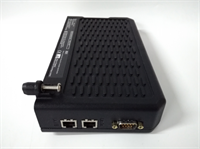
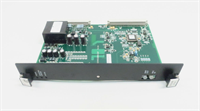
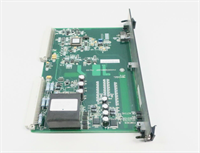
Data starvation kills more control projects than bad code ever does. The IS200EGDMH1ADF is the workhorse that keeps your HMI screens from freezing and your historian from gaping holes. In the Mark VIe world, the main processor (UCIO/VCMI) is busy doing math to keep the turbine from exploding; it doesn’t have time to babysit every SCADA request. That’s where this EGD board steps in. It offloads the network traffic, dedicated solely to shuffling data packets at wire speed.I’ve deployed these in combined cycle plants where the network load is insane—hundreds of tags updating every 10 milliseconds. The “ADF” revision usually comes with improved buffer management, meaning it handles burst traffic better than the older “ABA” or “ABC” versions without dropping packets. It’s not flashy. It doesn’t have a touchscreen. But when the operator needs to see exhaust temperature spread right now, this board is the reason the number shows up. Just make sure your network switches are configured correctly; this card hates half-duplex connections and will throw errors until you fix the switch port settings.
Quality SOP & Tech Pitfalls (The Reality Check)
The Lab Report (SOP)
We don’t just plug these in and hope. Data integrity is everything.
- Visual Inspection: We check the RJ45 magnetics for physical damage and inspect the EEPROM chip for signs of heat stress.
- Throughput Stress Test: We connect the board to a traffic generator on our test rack. We flood it with 64 concurrent EGD exchanges at 2ms update rates. If packet loss exceeds 0.01%, it fails.
- Latency Measurement: Using a Wireshark capture on the test bench, we verify end-to-end latency stays under 2ms for critical tags.
- Firmware Verification: We read the onboard flash and cross-reference it with the GEH-6721 manual for the target system version. Mismatched firmware causes “ghost” communication faults.
- Sealing: Immediate anti-static bagging. These comms chips are sensitive to static discharge.
The Engineer’s Warning (Pitfalls)
The silent killer here is the EGD ID mapping. I’ve seen weeks of downtime because a technician swapped an EGD board but didn’t realize the new board had a default configuration that conflicted with the existing network IDs. The system would “see” the board, but the data exchanges would timeout silently. Always download the exact configuration file (.CFG) from the engineering workstation to the new card before putting it live.Another trap: Cable quality. Since this runs standard Ethernet, people think any Cat5 cable from the hardware store will work. Wrong. In an industrial environment with VFDs and high-voltage switching, you need shielded, industrial-grade Cat5e with proper grounding at one end only. Unshielded cables in a turbine enclosure act as antennas for noise, causing intermittent EGD timeouts that look like board failures but are actually EMI issues.
Installation & Configuration Guide
Time Estimate: 30 Minutes
- Pre-Installation ⚠️
- Notify operations that network redundancy might be briefly compromised.
- CRITICAL: Export the current EGD configuration file from the engineering toolbox. You will need this to flash the new board.
- Take a photo of the LED status on the failing board (if still lit) for comparison.
- Removal
- Label both Ethernet cables (Port A and Port B). Swapping them can break redundancy rings.
- Disconnect cables.
- Release the retention clip and slide the module out.
- Installation
- Insert the new IS200EGDMH1ADF into the slot. Ensure it seats fully.
- Reconnect Ethernet cables to the correct ports.
- Configuration Load: Before powering up the whole system, connect your laptop to the service port (if available) or use the toolbox to push the saved EGD configuration file to the new board. Do not skip this. The board needs to know its ID and exchange list.
- Power-On & Testing
- Power up the rack.
- Observe LEDs: “OK” should be steady green. “LAN” links should be active.
- Go to the HMI or Engineering Workstation. Check the “Communications Diagnostics” screen. Look for “Good Exchanges” count increasing and “Timeouts” staying at zero.
- Force a tag change in the logic and verify it updates on the HMI within the expected scan time.
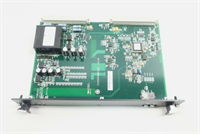
IS200EGDMH1ADF GE
Compatible Replacement Models
| Compatibility Tier | Model Number | Notes |
|---|---|---|
| ✅ Drop-in Replacement | IS200EGDMH1ADF | Exact match. Best for minimizing configuration headaches. |
| ⚠️ Software Compatible | IS200EGDMH1ADG | Newer hardware revision. Requires firmware update and potentially a recompilation of the EGD database. Allow 1 hour for engineering validation. |
| ❌ Hardware Mod Required | IS200EGDMH1A | Older revision. May lack the buffer size for modern high-density data exchanges. Not recommended for systems with >32 exchanges. |
Frequently Asked Questions (FAQ)
Can I swap this board while the turbine is running?
Technically, yes, if your system is configured for redundant communications and the other path is healthy. However, you will likely trigger a “Communication Loss” alarm on the HMI during the swap. If you are on a single-network setup, do not hot-swap; you will lose visibility and potentially control. Schedule a brief window if possible.Why are my EGD exchanges timing out after replacement?
90% of the time, it’s a configuration mismatch. The new board came blank or with factory defaults. You must download the specific site configuration file (the .CFG or .EGB file) from your engineering toolbox to the new card. Also, check that the DIP switches (if present on your specific sub-revision) match the old board’s node ID settings.Does this support Modbus TCP directly?
Yes, the EGDM can act as a Modbus TCP gateway, but it requires specific configuration in the Toolbox software to map EGD internal variables to Modbus registers. It’s not automatic. You have to build the map.What do the blinking amber LEDs mean?
Usually indicates link activity but potential errors, or a speed mismatch (10Mbps vs 100Mbps). Check your network switch settings. The Mark VIe EGD modules prefer 100Mbps Full Duplex. If the switch is set to Auto-Negotiate and fails, force the switch port to 100/Full.How many of these do I need per rack?
Typically one per control panel for network connectivity. In highly redundant setups, you might see two for separate network rings (Network A and Network B), but they usually reside in different racks or slots depending on the architecture. Check your system schematic (GED file). Don’t just guess based on empty slots.