 Tel:
Tel:  Email:
  WhatsApp:
 Description
Product Introduction
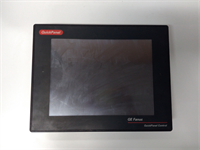
The GE IC754CSL12CTD QuickPanel+ was designed to be the “sweet spot” between basic text displays and full PC-based panels. Its 12.1-inch screen provided enough real estate to display complex trends, mimic diagrams, and alarm histories without taking up excessive panel space. Running on Windows CE, it offered the familiarity of a Windows environment with the determinism and fast boot times required for industrial control.We recently assisted a food packaging facility that had a line down for 48 hours because their original QuickPanel+ failed. The machine logic was written in an older version of Proficy Machine Edition that didn’t easily port to the newest Emerson PACSystems HMIs without significant rework. Sourcing a replacement IC754CSL12CTD allowed them to simply swap the hardware, restore the backup image, and resume production in under 4 hours. To be frank, while these units are technically “legacy,” they remain incredibly robust. The resistive touchscreens work perfectly even when operators are wearing thick gloves or when the screen is wet—conditions that often frustrate modern capacitive glass screens.
Key Technical Specifications
| Parameter | Value |
|---|---|
| Part Number | IC754CSL12CTD |
| Display Size | 12.1 Inches Diagonal |
| Display Type | Color STN LCD (Super Twisted Nematic) |
| Resolution | 800 x 600 pixels (SVGA) |
| Touch Technology | Analog Resistive Touchscreen |
| Processor | XScale or similar ARM-based (Windows CE .NET) |
| Memory | 64MB – 128MB RAM / 128MB Flash Storage (Typical for era) |
| Operating System | Windows CE .NET 4.2 or 5.0 |
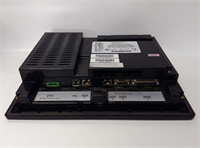
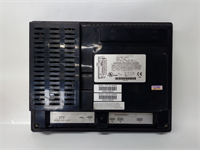
| Communication Ports | 1x 10/100 Ethernet, 2x RS-232/485 (Combo), 1x USB Host |
| Power Input | 24 VDC (±10%) |
| Mounting | Panel Mount (NEMA 4X / IP66 Front Bezel) |
| Keypad | Integrated Function Keys / Alphanumeric (Model Dependent) |
| Certifications | UL, CE, C-Tick |
| Status | Obsolete / End of Life (EOL) – Supported via Third Party/Refurb |
IC754CSL12CTD GE
Application Scenarios & Pain Points
A bottling plant struggled with frequent HMI lockups on their filler line. The root cause was identified as the aging backlight inverter in their original QuickPanel+ failing, causing the screen to dim and flicker until the unit crashed. Replacing the unit with a refurbished IC754CSL12CTD with a new backlight assembly restored visibility and stability. This model is particularly valued in environments where operators need to enter batch recipes manually; the combination of a large touch area and physical function keys speeds up data entry compared to pure touch interfaces.
- Automotive Assembly: Used at manual stations to guide operators through torque verification steps. The large 12″ screen can display multiple instructions and diagrams simultaneously.
- Pharmaceutical Packaging: What if you need strict audit trails? The Windows CE OS supports user login levels and event logging, which can be exported via Ethernet to a central historian for FDA compliance.
- Water Treatment: Remote pump stations often use the IC754CSL12CTD due to its wide operating temperature range and sealed front bezel (IP66), protecting against hose-down cleaning and humidity.
- Material Handling: Conveyor sortation systems rely on the fast response time of the QuickPanel+ to display jam locations and allow supervisors to override sensors instantly.
Case Study:
A mid-sized plastic injection molding facility in Ohio operates 20 presses, each controlled by a GE Fanuc PLC and monitored by a QuickPanel+. When one press suffered a catastrophic HMI failure (black screen, no backlight), the maintenance team discovered that the specific model was no longer stocked by major distributors. Instead of upgrading all 20 HMIs to a new platform (estimated cost: $40,000 + 3 weeks of programming), they sourced a lot of five refurbished IC754CSL12CTD units from a specialized surplus vendor. They swapped the failed unit, loaded the existing .pme project file from their server, and were back online in 30 minutes. They kept the other four as spares. This “like-for-like” replacement strategy saved the company over $35,000 and avoided potential compatibility bugs associated with migrating old HMI projects to new hardware generations.Lessons Learned: Installation Pitfalls
- Backlight Inverter Failure — The most common failure mode for the IC754CSL12CTD is not the computer itself, but the CCFL backlight inverter. ❗ If the screen is visible with a flashlight but appears black, the inverter has likely failed. When buying replacements, verify if the unit includes a refurbished backlight assembly or if you need to source the inverter board separately. Modern LED retrofit kits exist but require careful modification.
- Touchscreen Calibration Drift — Over time, the resistive touchscreen layers can separate slightly or degrade, causing the cursor to drift or register touches in the wrong location. Always run the touchscreen calibration utility (accessible via the Control Panel or a boot-up key combo) immediately after installation. If calibration fails repeatedly, the digitizer layer is likely damaged and the screen needs replacement.
- Battery Backed RAM Loss — These units often use a small internal battery to retain SRAM data (like recipe buffers or certain system settings) when power is cut. If the unit has been in storage for years, this battery may be dead. ❗ Upon first power-up, you might see “Low Battery” warnings or lose stored variables. Have the project file ready to reload, and consider opening the unit to replace the coin-cell battery if you plan to keep it as a long-term spare.
- Ethernet Port Speed Mismatch — The IC754CSL12CTD typically features a 10/100 Mbps Ethernet port. Connecting it directly to a modern Gigabit (1000 Mbps) switch without auto-negotiation can sometimes result in link failures or extremely slow communication. If connection issues arise, try inserting a cheap unmanaged 10/100 switch between the HMI and the main network, or force the PLC/switch port to 100Mbps Full Duplex.
- Project File Version Compatibility — While the hardware is interchangeable, the Proficy Machine Edition software version matters. A project created in a very new version of the software might not download correctly to an older CE kernel, or vice versa. Always check the “Target Device” settings in your development software to ensure it matches the specific OS version running on the IC754CSL12CTD (e.g., WinCE 4.2 vs 5.0). Keep a copy of the original development environment if possible.