 Tel:
Tel:  Email:
  WhatsApp:
 Description
Product Introduction
The GE IC698ETM001 solves one of the most common bottlenecks in large-scale automation: network saturation. In traditional PLC architectures, the main CPU must pause its logic execution to send and receive every Ethernet packet. When a system needs to communicate with 50+ drives, 100+ smart meters, or a massive SCADA historian, the CPU spends more time talking than controlling. The ETM001 acts as a dedicated “network card with a brain,” taking over all Ethernet protocol stacks and data movement.We recently supported a combined-cycle power plant where the main RX7i CPU (a CPE030) was struggling to maintain a sub-10ms scan time. The root cause was identified as the CPU attempting to poll 200+ Modbus TCP energy meters every second. By installing the IC698ETM001, we offloaded all meter polling to the coprocessor. The result was immediate: the main CPU scan time dropped to 4ms, and the communication became rock-solid with zero timeouts. To be frank, trying to force a standard CPU to handle this volume of traffic is a design flaw; the ETM001 is the engineered solution to decouple control logic from data acquisition, ensuring deterministic control regardless of network load.
Key Technical Specifications
| Parameter | Value |
|---|---|
| Part Number | IC698ETM001 |
| System Compatibility | GE PACSystems RX7i (Universal Backplane) |
| Processor Type | Dedicated Communication Coprocessor (Offloads Main CPU) |
| Network Interface | 1x or 2x 10/100 Mbps Ethernet (RJ45) – Check specific revision |
| Max Connections | Supports hundreds of simultaneous SRTP/Modbus TCP clients/servers |
| Protocols Supported | SRTP (Service Request Transport Protocol), Modbus TCP/IP (Client/Server), EGD (Ethernet Global Data) |
| Data Buffering | Large onboard memory for queuing messages during network spikes |
| CPU Offload Efficiency | Can reduce main CPU communication overhead by 70-90% |
| Mounting | RX7i Universal Backplane Slot (Any slot, configured via hardware config) |
| Power Consumption | Typical 1.5A – 2.0A @ 5VDC |
| LED Indicators | RUN, FAULT, LINK/ACT (per port), LOAD |
| Configuration Tool | Proficy Machine Edition (Hardware Configuration & Logic Builder) |
| Operating Temperature | 0 °C to 60 °C |
| Certifications | UL, CE, CSA |
| Status | Active / Legacy Support (Critical for large network expansions) |
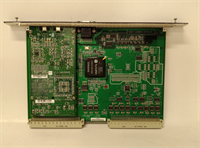
IC698ETM001 GE
Application Scenarios & Pain Points
A major oil refinery needed to integrate a new distributed analyzer system involving 80 gas chromatographs into their existing RX7i control system. The initial attempt using the main CPU’s built-in Ethernet port resulted in constant “Watchdog” faults and lost data because the CPU couldn’t keep up with the ASCII/Modbus parsing. Installing the IC698ETM001 allowed the system to handle all 80 connections asynchronously. The coprocessor buffered the data and passed only the relevant results to the main CPU, stabilizing the entire unit. This module is vital because it allows legacy RX7i systems to scale into the IoT era without replacing the core controller.
- Power Generation (Utility Monitoring): Connecting to hundreds of protective relays and metering devices. The ETM001 handles the high-frequency polling required for fault recording without slowing down turbine control logic.
- Water/Wastewater Distribution: Managing vast networks of remote pump stations and flow meters over WAN/MAN links. The ETM001’s robust buffering prevents data loss during temporary network latency.
- Automotive Assembly: Coordinating data from dozens of robot controllers and vision systems. The ETM001 ensures that production data logging doesn’t interfere with real-time safety interlocks.
- Pharmaceutical Batch Recording: Aggregating massive amounts of trend data from sensors for FDA compliance. The ETM001 streams this data to historians continuously while the CPU focuses on batch state logic.
Case Study:
A steel mill’s continuous caster was upgraded with a new secondary cooling model that required real-time temperature data from 150 thermocouples transmitted via smart transmitters over Modbus TCP. The existing RX7i system (equipped with a CPE030 CPU) began missing cooling valve adjustments because the CPU scan time ballooned to 60ms while processing the network traffic. This caused surface cracks in the steel slabs. The engineering team installed an IC698ETM001 module. They reconfigured the project to move all Modbus polling logic to the ETM. The main CPU scan time returned to 8ms, restoring precise valve control. The upgrade eliminated the quality defects and saved the mill an estimated $300,000 per year in scrap reduction, proving that the cost of the ETM module was negligible compared to the quality gains.Lessons Learned: Installation Pitfalls
- Configuration Complexity — The ETM001 is not “plug-and-play”; it requires specific configuration in the Hardware Configurator and often distinct logic blocks (like
NET_EXCHor specific Modbus instructions targeted at the ETM). ❗ Failing to correctly map the data exchange tables between the ETM and the main CPU memory (%R, %I, %Q) will result in the CPU seeing no data, even if the network lights are blinking. Always verify the “Exchange Table” definitions carefully. - IP Address Management — Since the ETM acts as a separate network entity, it requires its own IP address configuration, distinct from the CPU (unless using specific proxy modes which are rare). ❗ Duplicate IP addresses on the network between the CPU and ETM (or other devices) will cause chaotic communication failures. Document all IP assignments meticulously before going online.
- Backplane Bandwidth Saturation — While the ETM offloads the CPU, it still uses the backplane to transfer data to the CPU. ❗ If you configure the ETM to update massive arrays of data (e.g., 10,000 words) every 1ms, you can saturate the RX7i backplane bandwidth, causing other modules to starve. Tune the update rates (pollling intervals) to match the actual process dynamics; don’t poll fast just because you can.
- Firmware Mismatch — The ETM001 firmware must be compatible with the main CPU firmware and the version of Proficy Machine Edition. ❗ Using an older CPU firmware with a newer ETM firmware (or vice versa) can lead to handshake failures or inability to go “Online.” Always check the GE/Emerson compatibility matrix before upgrading one component without the other.
- Diagnostic Blind Spots — Because the communication processing happens on the ETM, standard CPU fault tables might not show detailed network errors. ❗ You must monitor the specific status registers and LED indicators on the ETM001 module itself to diagnose connection drops or timeout issues. Relying solely on the CPU fault viewer will leave you guessing.