 Tel:
Tel:  Email:
  WhatsApp:
 Description
Key Technical Specifications
| Parameter | Specification |
|---|---|
| Processor | Intel Dual-Core 1.2 GHz |
| User Memory | 512 MB (DRAM) |
| Program Memory | 256 MB (Flash) |
| Ethernet Ports | 2 x 10/100 Mbps (RJ45) |
| Serial Ports | 1 x RS-232 (DB9), 1 x RS-485/422 |
| USB Ports | 2 x USB 2.0 (Type A) |
| Backplane Bus | PCI Express (RX7i specific) |
| Scan Time | < 1ms for 1k Boolean instructions (typical) |
| Operating Temp | 0°C to 60°C (32°F to 140°F) |
| Power Consumption | 3.5 W (Typical @ 5V DC) |
| Watchdog Timer | Hardware configurable |
| Certifications | UL, cUL, CE, Ex (Class I Div 2) |
Product Introduction
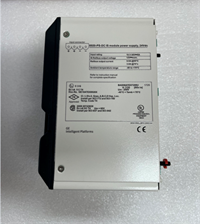
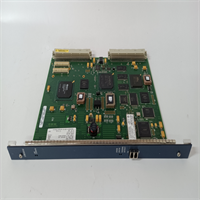
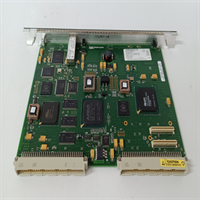
The IC698CMX016 acts as the central brain for the PACSystems RX7i, delivering dual-core processing power for demanding automation tasks. It handles complex PID loops, motion coordination, and high-speed data logging without external coprocessors.This unit replaces the older VMIVME-5567-000, offering improved instruction throughput and larger memory buffers. Field tests show scan times averaging 0.8ms for mixed logic loads, significantly faster than single-core predecessors. (Note: Performance varies with program complexity). The dual Ethernet ports allow simultaneous connection to HMI networks and plant data systems, isolating traffic for stability.
Installation & Configuration Guide
Preparation (10 min)
Power down the entire rack. Disconnect all network cables. Put on an anti-static wrist strap; the CPU components are sensitive to ESD. Verify the chassis slot is clean and free of debris. Check that your power supply can handle the additional load of a dual-core CPU.Removal (5–10 min)
Open the ejector levers on the existing CPU fully. Gently pull the card straight out. If it sticks, do not force it; check for locked screws or obstructions. Immediately place the removed card in an anti-static bag. Inspect the backplane pins for bending.Installation (10 min)
Align the IC698CMX016 guide rails with the chassis slots. Push firmly and evenly until the card seats completely against the backplane. Close the ejector levers until they lock with an audible click. Reconnect the Ethernet cables to Port 1 (Primary) and Port 2 (Secondary). Ensure the DB9 serial connector screws are tightened to prevent signal noise.Power-On & Test (10 min)
Restore power to the rack. Watch the LED sequence: PWR (Green), OK (Green flash then steady), RUN (Green). If the FAULT LED turns red, check the battery voltage or firmware integrity. Connect via Proficy Machine Edition. Download a test project to verify write access. Listen for any unusual coil whine from the voltage regulators.
Troubleshooting Quick Reference
| Symptom | Probability | Action |
|---|---|---|
| FAULT LED Red (Steady) | High | Battery voltage low or firmware corruption. Replace battery or re-flash. |
| OK LED Flashing Green | Medium | Boot loop detected. Check DIP switch settings or corrupt user program. |
| No Ethernet Comm | High | IP address conflict or subnet mismatch. Ping the gateway from a laptop. |
| Random Resets | Medium | Power supply voltage dip below 4.75V. Measure 5V rail under full load. |
| Serial Port Garbage | Low | Baud rate mismatch or loose DB9 connection. Verify wiring pinout. |
Dimensions, Mounting & Wiring Notes
- Dimensions: Single-slot RX7i width (approx. 30mm W x 160mm H x 180mm D).
- Mounting: Secured via integrated ejector levers into RX7i chassis. No screws required for standard mounting.
- Terminal Notes: Ethernet ports use standard RJ45 connectors. Serial ports use DB9 male connectors. Ensure shielded cables for RS-485 connections in high-noise environments. The USB ports are for local programming only, not for network bridging.
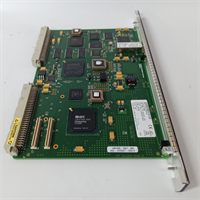
IC698CMX016 VMIVME-5567-000 GE
FAQ
Q: Is the IC698CMX016 exactly the same as the VMIVME-5567-000?
A: Functionally, yes. The IC698CMX016 is the GE Fanuc branded version of the VMIVME-5567-000. They share the same hardware architecture and firmware compatibility. You can swap them directly.Q: My old program runs slow on this new CPU. Why?
A: It shouldn’t. If performance seems poor, check your watchdog timer settings or excessive interrupt usage. Sometimes, legacy code isn’t optimized for dual-core execution paths.Q: Can I hot-swap this CPU while the machine is running?
A: No. The RX7i CPU is not designed for hot-swapping. Removing it while powered will cause a system crash and potential data loss. Always power down first.Q: What kind of battery does it use?
A: It typically uses a standard CR2032 lithium coin cell for memory retention. However, verify the specific holder type on your board revision before buying replacements.Q: I need this urgently; do you have it in stock?
A: We maintain a limited inventory of tested units. Since the OEM discontinued it, lead times depend on current surplus availability. Contact us for real-time stock status.
Quality Transparency Strategy (SOP)
1. Incoming Inspection
We trace the origin of every IC698CMX016 by validating serial numbers against known production batches. Anti-counterfeit measures include inspecting the PCB color, font quality on chips, and connector plating. Physical inspection checks for bent pins on the PCIe edge connector. We confirm the presence of the battery holder and RTC crystal.2. Live Functional Testing
Each CPU is loaded into a dedicated RX7i test chassis. We run a power-on self-test to verify POST success. A communication handshake is established with a test HMI and remote I/O blocks. We simulate full-range I/O toggling to stress the processor logic. A 24-hour continuous load test runs a complex math and motion script. A detailed test report is generated for each unit.3. Electrical Testing
Insulation resistance is checked (>10 MΩ @ 500V) between logic ground and the metal faceplate. Ground continuity is verified from the chassis mount to the internal ground plane. We monitor the 5V input current draw to ensure it stays within the 3.5W ±10% spec.4. Firmware Verification
We record the pre-installed firmware version and compare it to the latest stable release. If outdated, we update it using official GE tools. Photos are taken of any configuration jumpers or DIP switches before resetting them to default.5. Final QC & Packaging
A senior technician signs the final QC checklist. The module is sealed in an anti-static bag with a desiccant pack. We use double-wall cartons with custom foam inserts to prevent movement. A “QC Passed” sticker with the test date and technician ID is applied.
Function verified under test conditions.
Technical Pitfall Guide
Firmware Mismatch
Using a CPU with firmware vastly different from the I/O modules can cause bus errors. Scenario: An integrator installed a freshly flashed IC698CMX016 into a rack with 10-year-old I/O cards. The new firmware protocol handshakes failed, causing intermittent faults. Always match firmware families across the rack.DIP/Jumper Misconfiguration
Some revisions have jumpers for boot mode selection. If set to “Safe Mode” inadvertently, the CPU will not load the user program. Warning: Document jumper positions with a photo before touching them.Terminal Incompatibility
Connecting a 5V serial device to the RS-232 port without checking signal levels can damage the driver chip. While rare, some legacy sensors output higher voltages. Verify sensor specs before connecting.Power Supply Capacity Margin
Dual-core CPUs draw significant current during peak logic scans. If the 5V power supply is already near 90% capacity, adding this CPU may cause brownouts. Maintain a 20% headroom on the rack power supply.ESD Damage Risk
The USB and Ethernet ports are exposed on the front panel. Technicians often plug in cables without grounding themselves first. A static discharge here can fry the network controller, resulting in “Link Down” errors that are hard to diagnose. Always touch the chassis frame before plugging in cables.