
 Tel:
Tel:  Email:
  WhatsApp:
 Description
Key Technical Specifications
| Parameter | Specification |
|---|---|
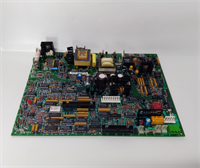
| Part Number | DS3800HFXA1D1B |
| Board Designation | TCQA (Analog I/O Board) |
| System Series | Mark V / RST |
| Input Signals | LVDT, Thermocouples (JAR/S/T), 4-20mA, Vibration (+/- 10V) |
| Output Signals | Servo Valve, Relay Driver, 4-20mA (20mA or 200mA selectable) |
| Communication | 3PL Data Bus (to STCA/COREBUS), JE Connector (to TCQC) |
| Power Source | 2PL Connector (from TCPS) |
| Configuration | Hardware Jumpers (J1, J2, J5, J6, J7, J8) |
| Operating Environment | Industrial / Turbine Control Cabinet |
| Origin | USA |
Product Introduction
If you are maintaining a GE Mark V turbine system, you know the panic of seeing an “Analog I/O Fault” alarm. The GE DS3800HFXA1D1B is the board causing that headache, but it’s also the solution. This is the TCQA (Analog I/O Board). It lives inside the I/O Core (R1, R2, R3) and acts as the translator between the dirty, noisy field signals and the pristine logic of the turbine controller.This board is critical because it handles the physical variables that keep a turbine from overspeeding or melting down. It scales LVDT position feedback for fuel valves, reads thermocouple temps, and manages 4-20mA pressure transmitters. What makes this specific board tricky—and valuable—is its configurability. It has hardware jumpers (J5, J6) that let you switch the current output range between 20 mA and 200 mA. If you install a replacement without checking those jumpers against your old board, your servo valves won’t move correctly, and you won’t get a flame. It’s a robust piece of hardware, but it demands respect during installation.
Quality SOP & Tech Pitfalls (The Reality Check)
The Lab Report (SOP)
We don’t just ship these in a box. The DS3800HFXA1D1B is sensitive to static and physical shock.
- Visual Inspection: We check the pin connectors (2PL, 3PL, JE) for bent pins. These connectors mate with the backplane; a bent pin means a dead core.
- Jumper Verification: We photograph the jumper settings (J1, J2, J5, J6). This is the most critical step. We verify they match the standard configuration or the customer’s specific requirement.
- Live Test: We run a signal injection test on the 4-20mA inputs to ensure the scaling logic is active and the board communicates over the 3PL bus.
- Packaging: It goes into a static-shield bag with anti-static foam. No exceptions.
The Engineer’s Warning (Pitfalls)
Watch the Jumpers.
I cannot stress this enough. The J5 and J6 jumpers determine if the board outputs 20mA or 200mA. If your system is wired for 200mA (common for certain servo valves) and the replacement board is set to 20mA, the valve will barely twitch. You will think the servo is bad, waste four hours troubleshooting, and then realize you missed the jumpers. Also, check the JE connector. It carries the generator and line signals. If that ribbon cable is loose, your synchronization logic will fail.
Installation & Configuration Guide
Replacing a TCQA board in a Mark V core requires precision.
- Pre-Installation:
- ⚠️ Safety First: Ensure the turbine control system is in a safe state (preferably stopped or in maintenance mode).
- Documentation: Take a high-resolution photo of the jumper settings on the failing board. Specifically J1, J2, J5, J6, J7, and J8.
- Removal:
- Disconnect the external cables carefully. Note that 3PL is the data bus and 2PL is power.
- Unscrew or unclip the board from the core chassis. Pull it straight out to avoid damaging the backplane connectors.
- Installation:
- Crucial Step: Adjust the hardware jumpers on the new DS3800HFXA1D1B to match the photo you took of the old board. Do not assume the factory default is correct.
- Slide the board into the slot. Ensure it seats firmly.
- Reconnect the ribbon cables (3PL, JE, etc.). Make sure the locking clips on the connectors engage.
- Power-On & Testing:
- Power up the core. Check the LEDs on the board (if visible) or the HMI for “Board OK” status.
- Verify analog readings. Check that the LVDT feedback matches the physical position.

Compatible Replacement Models
| Model | Compatibility | Notes |
|---|---|---|
| GE DS3800HFXA1D1B | ✅ Direct Replacement | Standard TCQA board. Verify jumper settings. |
| GE DS3800HRCA1D1B | ⚠️ Functional Equivalent | Also a TCQA Analog I/O board. Check datasheet for minor revision differences in signal conditioning. |
| GE DS200TCQAG1B | ❌ Different Series | This is for Mark VI. Physically different form factor and protocol. Will not fit Mark V core. |
Frequently Asked Questions (FAQ)
What does the “TCQA” designation mean?
It stands for Turbine Control Quadrant Analog. It identifies the board’s function within the Mark V architecture. It’s the analog interface for the specific “core” (R1, R2, or R3) it is installed in.Can I use this for vibration monitoring?
Yes. The board has a JG connector specifically designed to accept +/- 10V DC inputs, which is standard for vibration transmitters (like Bently Nevada proximitors). Just ensure the input scaling is configured correctly in the control logic.Why are there so many connectors (2PL, 3PL, JE, JF)?
The Mark V system is modular. 2PL brings in power. 3PL is the internal data highway connecting the boards in the core. JE handles high-speed signals like generator sync. JF is specifically for LVDT position feedback. They separate the noisy power and high-speed signals to prevent interference.Is this board hot-swappable?
Technically, the Mark V is a Triple Modular Redundant (TMR) system, so you can swap a board while the turbine is running. However, I strongly advise against it unless you are an expert. Pulling a board from a live core risks tripping the turbine if you accidentally short a connector or disturb the backplane. Shut down if possible.What is the difference between J1/J2 and J5/J6 jumpers?
J1 and J2 select the milliamp output circuit mode. J5 and J6 configure the current range—either 20 mA or 200 mA. Getting J5/J6 wrong is the most common installation error.Does this come with a warranty?
Yes, typically 1 year for new surplus. Since this is legacy hardware, we test it thoroughly before shipping to ensure it’s not DOA (Dead on Arrival).