Tel:
Tel:  Email:
  WhatsApp:
 Description
Key Technical Specifications
| Parameter | Specification |
|---|---|
| Input Voltage | 38 to 115 VAC |
| Frequency | DC to 500 kHz (dependent on input) |
| Internal Circuits | 5 (Driver, Control Level, Motor Field, AC/DC Monitor) |
| Protection | 3 On-board Fuses with LED/Neon indicators |
| Configuration | 12 Jumpers, 7 DIP Switches |
| Test Points | 5 Accessible points for voltage monitoring |
| Compatible Series | FC2000, AC2000, DC2000, ME2000, CB2000, EX2000 |
| Mounting | Mark V I/O Core / Drive Chassis |
| Indicators | Integrated LED and Neon status lights |
Product Introduction
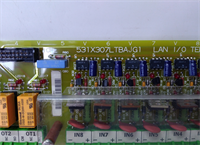
If you’ve ever stood in front of a GE Mark V panel with a “Control Power Loss” alarm screaming at you, you know the drill. The DS200DCFBG1BNC isn’t just a circuit board; it’s the heartbeat of your turbine or drive system. I’ve seen plants lose days of production because this specific power board went belly up, taking the control logic down with it. It’s an older design, sure, but it’s built like a tank—provided you don’t fry it with bad input power.This board handles the dirty work of converting that 38-115 VAC input into clean, usable power for the Mark V core and chassis fans. It’s packed with five distinct internal circuits, including a motor field power circuit and driver circuit. What I actually like about it is the serviceability; unlike modern potted modules where you have to guess what blew, this board has five accessible test points and visible fuses. You can troubleshoot it with a multimeter in five minutes flat. Just be careful with the jumpers—if you mismatch the configuration from the old board, you’re dead in the water.

Quality SOP & Tech Pitfalls (The Reality Check)
The Lab Report (SOP)
We don’t just pull these off the shelf and tape them up.
- Visual Inspection: We check the “New Surplus” packaging first. If the anti-static bag is torn, we inspect for oxidation on the pins.
- Configuration Audit: We verify the Jumper (J) and DIP switch settings against a standard baseline or customer requirements.
- Live Test: We run a “Live Test” on a Mark V test rack, verifying the 38-115 VAC input tolerance and checking the output rails for ripple.
- Fuse Integrity: We use a Fluke multimeter to ensure continuity across the three on-board fuses.
- Packing: Double-bagged in anti-static wrap with bubble reinforcement.
The Engineer’s Warning (Pitfalls)
- The “Magic Smoke” Scenario: The input voltage range is 38-115 VAC. If your control transformer is fluctuating or sending spikes above 115V, you will blow the on-board fuses instantly. I once saw a guy hook this up to a 240V line because he didn’t check the transformer taps. He toasted the board and the backplane connector. Check your input voltage before you seat the card.
- Jumper Hell: This board has 12 jumpers and 7 DIP switches. If you swap the board and forget to copy the exact jumper settings from the old unit, the drive won’t recognize the card, or worse, it will send the wrong voltage to the motor field. Take a high-res photo of the old board’s settings before you pull it out.
Installation & Configuration Guide
Phase 1: Pre-Installation (Safety First)
️ Lockout/Tagout (LOTO): De-energize the control panel. Wait at least 5 minutes for capacitors to discharge.
️ Documentation: Take a clear photo of the existing board’s jumpers and DIP switches. This is your lifeline.
Phase 2: Removal
- Disconnect the wiring harnesses (check for brittle insulation on old wires).
- Release the DIN rail clips or mounting screws carefully.
- Slide the board out. Don’t force it; if it sticks, check for snagged wires.
Phase 3: Installation
- Configuration: Set the 12 Jumpers and 7 DIP switches on the new DS200DCFBG1BNC to match your photo exactly.
- Seat the board into the chassis or core. Ensure it sits flush.
- Reconnect the wiring. Tighten terminals to spec—loose connections cause arcing, which kills these boards.
Phase 4: Power-On & Testing
- Verify input voltage at the terminals with a multimeter (Target: 38-115 VAC).
- Apply power. Watch the LED indicators.
- Use the 5 test points to verify the internal voltage levels match the manual’s specifications.
Compatible Replacement Models
| Compatibility Tier | Model Number | Notes |
|---|---|---|
| Drop-in Replacement | DS200DCFBG1BNC | Exact match. Ensure jumpers are copied. |
| Direct Equivalent | DS200DCFBG1BJB | Hardware compatible. Verify firmware/revision notes. |
| ️ Hardware Mod | DS200LDCFBG1BNC | Similar function but check mounting points and connector pinouts. |
| Incompatible | DS200TCQAG1… | Different function (Analog I/O). Do not attempt to swap. |

Frequently Asked Questions (FAQ)
Q: Can I hot-swap this board while the turbine is running?
A: Absolutely not. This is a power supply board. Pulling it live will arc the connectors, likely welding them to the backplane and tripping the turbine. You need a full shutdown to change this.Q: My new board has different jumper settings than the old one. What do I do?
A: Ignore the factory default settings. You must manually move the jumpers and flip the DIP switches to match your old board exactly. The manual provides a “default” map, but your application (e.g., FC2000 vs AC2000) dictates the specific setup.Q: The LED indicators aren’t lighting up. Is it dead?
A: Not necessarily. First, check the three on-board fuses. If they are blown, replace them (check the manual for the correct amperage). If fuses are good, check your input voltage at the terminals. If you have 115VAC input and no lights, then yes, it’s likely a dud.Q: Is this board compatible with the Mark VI system?
A: No. This is strictly for the Mark V series and compatible drives (FC2000, AC2000, etc.). Mark VI uses a completely different architecture (Ethernet-based).Q: What does the “BNC” suffix mean?
A: It generally denotes a specific revision or manufacturing batch within the Mark V family. Functionally, it replaces the standard DCFBG1B requirements, but always cross-reference the “Instruction Letter” (IL) number on the board with your system manual.Q: How do I test the motor field circuit?
A: Use the five test points located on the board edge. The manual lists the expected DC voltage for the motor field circuit. If you read 0V or fluctuating voltage there, your motor field power circuit is faulty.