 Tel:
Tel:  Email:
  WhatsApp:
 Description
Key Technical Specifications
| Parameter | Specification |
|---|---|
| Product Model | Foxboro P0973KJ |
| Module Type | FBM242 (Fieldbus Module) |
| Function | 32-Channel Digital Input |
| Input Voltage | 24 VDC (Nominal) |
| Input Current | 2.5 mA per channel (Typical) |
| Logic Levels | 0 = < 5 VDC; 1 = > 15 VDC |
| Isolation | Channel-to-Bus Isolation (1500 V) |
| Communication | I/A Series Fieldbus |
| Operating Temp | 0°C to 60°C |
| Dimensions | Standard I/A Series FBM Form Factor |
Product Introduction
The Workhorse of the I/A Series Racks
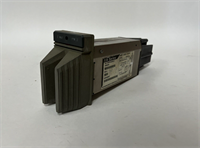
You don’t choose Foxboro I/A Series for the flashy UI; you choose it because it runs refineries for thirty years without a reboot. The P0973KJ (FBM242) is the standard 32-point digital input card. It sits in the rack, quietly monitoring 32 different limit switches, pressure stats, or motor feedback contacts. It’s not exciting, but if it fails, your operator goes blind to half the plant floor.Why you need this specific revision
The P0973KJ is the evolution of the earlier FBM201/202 cards. It packs double the density (32 channels) into the same slot width. The “KJ” suffix indicates a specific hardware revision that improved noise immunity and reduced power consumption. I’ve pulled these out of cabinets that have been baking at 55°C since the late 90s, and they still test within tolerance. It’s a robust piece of hardware, provided you don’t force the connector into the backplane.
Quality SOP & Tech Pitfalls (The Reality Check)
The Lab Report (SOP)
We treat these legacy cards like museum artifacts because the silicon is getting harder to find.
- Visual Inspection: We inspect the 96-pin DIN connector for bent pins—a common issue with rack removals. We also check for capacitor leakage.
- Live Test: We install the P0973KJ into a verified I/A Series node. We toggle all 32 inputs via a test rack to ensure the LED indicators match the register state in the software.
- Optical Check: We verify the isolation barrier. We don’t want field noise frying your main processor.
- Packaging: Wrapped in anti-static shielding, then boxed with heavy-duty foam. No loose rattling.
The Engineer’s Warning (Pitfalls)
The FTA Trap.
This module does not connect directly to your field wiring. It plugs into a Terminal Board or a Field Termination Assembly (FTA). If you buy this card but have a damaged or incompatible FTA (like the P0916XX series), this card is useless. Check your termination board part number.
Backplane Force.
The connectors on these I/A Series racks are tight. I’ve seen guys use a hammer to seat a card. Don’t do that. You will crack the PCB traces, causing an intermittent fault that will drive you crazy six months later. Use the insertion tool or steady, even pressure.
Installation & Configuration Guide
Phase 1: Pre-Installation
- Safety First: While the I/A Series supports hot-swap to an extent, I strongly recommend removing power to the specific rack if possible. If you must hot-swap, ensure you are grounded to the rack chassis.
- Identify Slot: Note the exact Node and Slot number (e.g., Node 05, Slot 12). The software expects the card in a specific physical location.
Phase 2: Removal
- Unlatch: Open the locking levers (ejectors) on the top and bottom of the faulty card.
- Extract: Pull the card straight out. If it sticks, wiggle it gently. Do not pry against the neighboring cards.
Phase 3: Installation
- Inspect: Check the P0973KJ connector pins. Ensure they are straight.
- Insert: Align the card with the guides. Push firmly and evenly on the faceplate until the connectors seat.
- Lock: Close the ejector levers. They should lock flush with the faceplate.
Phase 4: Power-Up
- Status Check: The “Module Status” LED should turn Green. If it flashes Red, you likely have a configuration mismatch or a bad backplane connection.
- Commissioning: In the workstation software, verify the “Point Status” for the inputs. Toggle a field switch to confirm the bit changes from 0 to 1.

Compatible Replacement Models
| Model Number | Compatibility | Notes |
|---|---|---|
| Foxboro P0973KJ | ✅ Direct Drop-in | Exact hardware match. Verify firmware revision. |
| Foxboro P0973KL | ✅ Direct Drop-in | Newer revision. Fully backward compatible. |
| Foxboro FBM241 | ⚠️ Software Compatible | 16-channel version. Fits same slot, but logic must be updated for channel count. |
| Foxboro P0904HA | ❌ Incompatible | Different form factor (FBM201). Will not fit the slot. |
Frequently Asked Questions (FAQ)
1. Does this card come with the terminal block?
No. The P0973KJ is just the module. It plugs into a carrier or termination assembly (like the P0916AW or similar FTA). You need to reuse your existing termination hardware.2. My system says “Module Missing” even after I installed it.
Check the DIP switches or jumpers on the front of the card (if applicable for your specific node type) to match the slot ID. Also, ensure the card is fully seated; if the connector is slightly loose, the bus won’t recognize it.3. Can I use this for 120VAC inputs?
No. This is a 24 VDC input card. If you connect 120VAC to it, you will let the magic smoke out instantly. For AC inputs, you need an FBM211 or similar AC-rated module.4. Is the “KJ” suffix important?
Yes. It denotes the hardware revision. While a “KL” might work, sticking to the exact suffix ensures you don’t run into subtle timing or power draw differences in older racks.5. How do I know if the inputs are working?
The P0973KJ has individual LEDs for each channel. If a field switch is closed, the corresponding LED on the faceplate should be lit. If the LED is on but the DCS reads “0”, check your common ground wiring on the FTA.