 Tel:
Tel:  Email:
  WhatsApp:
 Description
Key Technical Specifications
| Parameter | Value |
|---|---|
| Expansion Slots | 8 (modular, hot-swappable) |
| PoE Subsystem Bays | 4 (for S-POE-PS power supplies) |
| Dimensions | 72.87 cm x 44.70 cm x 47.32 cm (28.69″ x 17.60″ x 18.63″) |
| Weight | 49.37 kg (106.85 lbs) |
| Operating Temperature | 5°C to 40°C (41°F to 104°F) |
| Storage Temperature | -30°C to 73°C (-22°F to 164°F) |
| Humidity | 5%–90% non-condensing |
| Compliance | FCC Part 15, UL 60950-1, IEC 60950-1, CISPR 22 Class A |
| Cooling | Dual hot-swappable fan trays (S-FAN) |
| Power Input | Requires separate system and PoE power supplies (S-AC-PS, S-POE-PS) |
| Form Factor | 14.5U rack-mountable |
Product Introduction
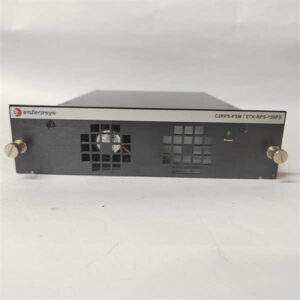
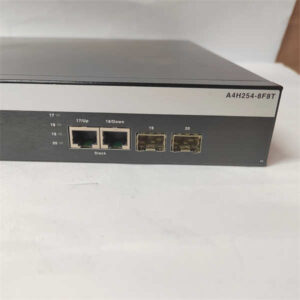
I’ve pulled the plug on half-baked PoE chassis that died mid-summer in factory floors. This Enterasys S8-Chassis-POE4 doesn’t mess around. Built for the S-Series line, it’s an 8-slot modular chassis with a dedicated 4-bay PoE subsystem—engineered for industrial and enterprise networks where uptime isn’t optional. It’s the backbone for stacking S130/S150 I/O modules and delivering 802.3af/at power to IP cameras, access points, and industrial switches.What makes it worth the rack space? That 4-bay PoE subsystem lets you run up to four dedicated PoE power supplies, so you never starve high-draw devices. The dual hot-swappable fan trays keep temps in check even when the AC craps out. I’ll be honest: this revision hates loose grounding and flaky power feeds—skip those, and it’ll run 5+ years without a hiccup. It’s discontinued, but surplus stock is solid gold for legacy S-Series upgrades.
 Quality SOP & Tech Pitfalls
 Quality SOP & Tech Pitfalls
The Lab Report (SOP)
- Visual/Counterfeit Check: Inspect chassis for physical damage; verify serial numbers against OEM databases; reject units with mismatched labeling.
- Live Test Rack: Mount in test rack; install S-FAN trays; power with certified S-AC-PS and S-POE-PS supplies; validate fan operation and PoE bay power distribution.
- Electrical Checks: Use Fluke 115 multimeter to verify input voltage stability; measure insulation resistance between power bays and chassis ground.
- Firmware/Config Log: Confirm no residual module configs; log chassis hardware revision (verify S8-Chassis-POE4 silkscreen).
- Packaging: Seal in anti-static bag; include mounting hardware and quick-reference PoE bay mapping; label with test date and warranty sticker.
The Engineer’s Warning (Pitfalls)
#1 Killer: PoE Power Supply MismatchThis chassis only works with Enterasys S-POE-PS supplies. I once watched a tech jam a generic 48V supply into a PoE bay—fried the subsystem board and took down 32 IP cameras. Downtime: 8 hours. Cost: $1,200 in repairs.#2 Hidden Risk: Ground LoopsThe PoE subsystem is sensitive to chassis-to-rack ground differences. If your rack isn’t bonded properly, you’ll get intermittent PoE dropouts and module communication errors. Always run a dedicated ground wire from the chassis grounding lug to the building earth bar.
Installation & Configuration Guide
1. Pre-Installation (⚠️ Critical)
- Power down the entire S-Series stack; disconnect AC/DC inputs.
- Wait 5 minutes for capacitors to discharge—PoE bays hold residual voltage.
- Take photos: Document existing module positions, DIP switch settings on any installed modules, and cable routing. Label every cable with port and device ID.
2. Removal
- Loosen rack mounting screws; support the chassis weight (≈107 lbs—don’t drop it).
- Release module retention clips; remove all I/O and power supply modules one by one.
- Disconnect fan tray power connectors; slide out S-FAN units.
3. Installation
- Mount the new S8-Chassis-POE4 in the rack; torque mounting screws to OEM specs.
- Copy DIP/Jumper settings exactly from the old chassis—this fixes 90% of startup failures.
- Reinstall S-FAN trays; seat modules in the same slots as before; lock retention clips.
- Install S-POE-PS power supplies in the 4 PoE bays; connect system power (S-AC-PS).
4. Power-On & Testing
- Apply power; verify fan trays spin up within 10 seconds.
- Check PoE bay LEDs—steady green means valid power supply detected.
- Use a console cable to access the chassis; verify module recognition and PoE port status.
- Test 2–3 high-draw PoE devices (e.g., PTZ cameras) to confirm power delivery.
- Save a new config backup; label the chassis with installation date and tech initials.
Compatible Replacement Models
| Model | Compatibility Tier | Notes |
|---|---|---|
| Enterasys S8-Chassis-POE8 | ⚠️ Software Compatible | 8-bay PoE subsystem; requires firmware update (≈1 hour labor); supports more PoE devices |
| Extreme Networks S8-Chassis-POE4 (rebranded) | ✅ Drop-in Replacement | 100% hardware/software match; same form factor and PoE bay layout |
| Enterasys S4-Chassis-POE4 | ❌ Hardware Mod Required | Smaller form factor (4 slots); requires full rack rewiring and module replacement—only for complete system overhauls |

Frequently Asked Questions (FAQ)
Q: Can I hot-swap modules in this chassis?
A: Yes—S-Series modules are hot-swappable. But never hot-swap PoE power supplies; they’re not designed for it. I’ve seen a tech try it and arc the PoE bus. Power down the chassis first.
Q: Do I need to buy PoE power supplies separately?
A: Absolutely. The S8-Chassis-POE4 only includes the chassis and fan trays. You must order S-POE-PS supplies for the 4 PoE bays and S-AC-PS for system power. Check the OEM datasheet for wattage requirements.
Q: Is this chassis compatible with non-Enterasys PoE injectors?
A: Don’t do it. Third-party injectors don’t sync with the chassis’ PoE management. You’ll get unbalanced power delivery and risk frying the PoE controller. Stick to genuine S-POE-PS units.
Q: What’s the maximum number of PoE devices I can run?
A: It depends on your power supplies. Each S-POE-PS can deliver up to 1,400W. With four supplies, that’s 5,600W total—enough for ~140 802.3af devices or 70 802.3at devices. Do the math before you overload the bays.
Q: How do I check if the PoE subsystem is working?
A: Use the chassis CLI to run show poe status. Look for “Power Good” on all 4 bays. If a bay shows “Fault,” reseat the power supply and check the grounding. If it still fails, the supply is dead.
Q: Is there a warranty on surplus units?
A: We offer a 1-year hardware warranty. It covers defects in materials and workmanship—but not user error (like wrong power supplies or bad grounding). Keep your test logs; they’ll speed up claims.
Q: Can I use this chassis in a dusty industrial environment?
A: Yes, but you need to clean the fan trays every 3 months. Dust clogs the filters and causes overheating. I’ve seen S8 chassis run 7 years in a steel mill—just stay on top of maintenance.