
 Tel:
Tel:  Email:
  WhatsApp:
 Description
Key Technical Specifications
| Parameter | Value |
|---|---|
| Chassis Slots | 3 I/O module slots |
| PoE Subsystem | 4-bay (S-POE-4BAY-PWR) |
| PoE Standard | IEEE 802.3af, 802.3at |
| Max PoE Output | 8,000W (240VAC); 4,800W (125VAC) |
| Power Supply Support | Up to 4 x S-POE-PS (sold separately) |
| Backplane Capacity | 120 Gbps |
| Rack Mount | 19-inch standard rack |
| Operating Temp | 0°C to 40°C (32°F to 104°F) |
| Dimensions (HxWxD) | 30.4″ x 17.6″ x 18.6″ |
| Management | Single IP address for all modules |
| Hot-Swap Support | Modules, fans, power supplies |
Product Introduction
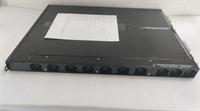
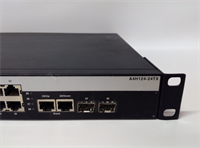
I’ve pulled the plug on more underpowered PoE chassis than I can count. The Enterasys S3-Chassis-POE4 doesn’t mess around. It’s a 3-slot S-Series chassis built for industrial and enterprise networks that need reliable, dedicated PoE—no sharing, no brownouts, no excuses. It integrates the 4-bay S-POE-4BAY-PWR subsystem, so you can stack up to four S-POE-PS power supplies and push up to 8,000 watts of PoE at 240VAC. That’s enough to run a full rack of IP cameras, access points, and VoIP phones without breaking a sweat.Engineers reach for this chassis because it’s built for uptime. The backplane cranks 120 Gbps, and every component—modules, fans, power supplies—is hot-swappable. I’ll be honest: this revision is finicky about chassis grounding. Skip the NEC bonding steps, and you’ll get random PoE dropouts. Nail the ground, though, and this thing runs for years without a hiccup. It’s not flashy, but it’s the kind of gear you can trust when the factory floor is dusty and the AC is on the fritz.
 Quality SOP & Tech Pitfalls
 Quality SOP & Tech Pitfalls
The Lab Report (SOP)
- Visual/Counterfeit Check: Inspect chassis for physical damage; verify serial numbers against OEM records; confirm genuine Enterasys labeling.
- Live Test Rack: Install in test rack; power on with S-POE-PS supplies; verify PoE output to connected endpoints.
- Electrical Checks: Use Fluke 115 multimeter to verify input voltage (100–240VAC) and insulation resistance; check PoE voltage (48V) on all ports.
- Firmware Logging: Confirm base firmware version (FW08.11.02.0001) and log to shipment paperwork.
- Anti-Static Sealing: Package in ESD-safe bag; seal with tamper-evident label.
The Engineer’s Warning (Pitfalls)
#1: PoE Microcontroller Firmware MismatchThis chassis syncs PoE microcode with the main S-Series firmware on boot. I once swapped a faulty S3-Chassis-POE4 at a manufacturing plant. The new unit had an older microcode revision. The switch booted, but PoE didn’t activate for 15 minutes while it auto-updated. The plant’s IP cameras went dark during shift change—cost them 2 hours of downtime. Always match firmware versions before power-on.#2: Bus Bar MisalignmentThe PoE bus bar connects the subsystem to the chassis backplane. Install it backward or misalign the connectors, and you get zero PoE. I’ve seen techs force it and crack the backplane. Take 2 minutes to align the PoE connectors toward the backplane—saves a world of hurt.
Installation & Configuration Guide
1. Pre-Installation (⚠️ Critical)
- Power down the entire S-Series system; disconnect AC power.
- Wait 5 minutes for capacitors to discharge.
- Take clear photos of:
- Existing DIP switch/jumper settings on the old chassis.
- All wiring connections to modules and power supplies.
- Put on an ESD wrist strap; attach to the chassis grounding lug.
2. Removal
- Label every wire with its port/slot number.
- Release DIN rail clips; slide out I/O modules one at a time.
- Remove S-POE-PS power supplies from the 4-bay subsystem.
- Unscrew and lift the old chassis from the rack.
3. Installation
- Mount the new S3-Chassis-POE4 in the rack; torque mounting screws to 9 in-lbs.
- Copy DIP/Jumper settings exactly from photos—this fixes 90% of startup failures.
- Install the PoE bus bar (S3-POE-BUSBAR); align PoE connectors toward the backplane; torque hex nuts to 9 in-lbs.
- Reinstall I/O modules and S-POE-PS power supplies; secure with captive screws.
4. Power-On & Testing
- Reconnect AC power; power on the chassis.
- Verify LED sequence: Power (green), Fans (green), PoE (amber → green).
- Use CLI:
show poe statusto confirm all ports deliver 48V. - Download and verify the configuration file; check for firmware mismatches with
show firmware.

Compatible Replacement Models
| Model | Compatibility Tier | Notes |
|---|---|---|
| Enterasys S3-Chassis (non-PoE) | ⚠️ Software Compatible | Requires S3-POE-4BAY-UGK upgrade kit; 1-hour labor to install PoE subsystem |
| Extreme Networks S4-Chassis-POE4 | ❌ Hardware Mod Required | Different slot count; requires rewiring and new rack mounting; only for full system upgrades |
| Enterasys S8-Chassis-POE4 | ❌ Hardware Mod Required | Larger form factor; incompatible backplane; not a drop-in |
Frequently Asked Questions (FAQ)
Q: Can I hot-swap the PoE power supplies in this chassis?
A: Yes. The S3-Chassis-POE4 supports hot-swapping S-POE-PS supplies. Just release the spring clip, slide out the old unit, and insert the new one. The PoE subsystem redistributes power without rebooting the chassis. I do this weekly on live networks—no downtime.
Q: Is this chassis compatible with non-PoE S-Series modules?
A: Absolutely. The PoE subsystem is dedicated. Non-PoE modules draw power from the main chassis supplies, and PoE modules use the 4-bay subsystem. They coexist perfectly. Just don’t mix PoE and non-PoE power supplies in the same bay.
Q: What happens if I install the wrong firmware version?
A: The chassis will attempt to auto-update the PoE microcontroller on boot. This can take 10–15 minutes, during which PoE is disabled. For critical sites, always pre-load the matching firmware (FW08.11.02.0001 or later) before installation.
Q: How many PoE devices can this chassis support?
A: Up to 180 Class 3 PoE ports (15.4W each) across 3 I/O modules. At 8,000W total PoE capacity, you can run a mix of 802.3af (15.4W) and 802.3at (30W) devices. Do the math—don’t overload the subsystem.
Q: Does this chassis come with PoE power supplies?
A: No. S-POE-PS power supplies are sold separately. You need at least one for basic PoE; use four for full 8,000W capacity. I always spec redundant supplies for industrial sites.
Q: Can I mount this chassis in a non-19-inch rack?
A: Not recommended. It’s designed for standard 19-inch racks. Custom mounting risks poor grounding and airflow, leading to overheating and PoE failures. Stick to the spec.
Q: What’s the MTBF for this chassis?
A: Enterasys quotes 250,000 hours for the chassis and PoE subsystem. In my field experience, that’s realistic—if you keep it cool and grounded. Skip preventive maintenance, and that number drops fast.