Tel:
Tel:  Email:
  WhatsApp:
 Description
Key Technical Specifications
| Parameter | Specification | Notes |
|---|---|---|
| Ports | 48 x 10/100/1000BASE-T (RJ45) | Auto-negotiating, Auto-MDIX |
| Uplinks | 4 x Gigabit SFP (Mini-GBIC) | Shared with ports 45-48 (typically) |
| PoE Budget | 740W Total | Supports ~48 devices @ 15.4W (802.3af) |
| PoE Standard | IEEE 802.3af (PoE) | Class 3 PoE support |
| Switching Capacity | 104 Gbps | Non-blocking fabric |
| Forwarding Rate | 77.4 Mpps | Wire-speed performance |
| MAC Address Table | 16,000 entries | Sufficient for large VLANs |
| Memory | 256 MB DRAM / 64 MB Flash | Standard for C3 generation |
| Management | CLI, Web, SNMP, NetSight | Supports IPv6 management |
| Dimensions | 1.72″ x 17.4″ x 15.5″ (1U) | Standard 19-inch rack width |
| Power Supply | Internal Redundant (AC) | Auto-ranging 100-240VAC |
| MTBF | > 100,000 hours | Typical for enterprise gear |
Product Introduction
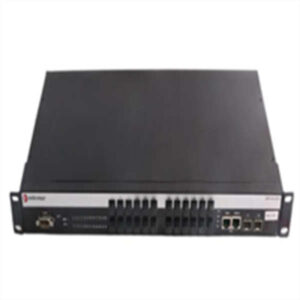
Let’s be real: in the enterprise world, cable clutter is the enemy. You’ve got a ceiling full of 802.11n access points and a desk on every floor with a softphone. You don’t want to hire an electrician to run a new 110V outlet for every single device. That is exactly where the Enterasys C3G124-48P earns its keep.I’ve deployed racks of these in university dorms and hospital wings. The “P” suffix is the money maker here—it stands for PoE. This chassis pushes 740 watts of power. Do the math: that is enough juice to run 48 standard VoIP phones or roughly 24-30 older generation Wi-Fi access points at full load without needing a separate power injector for each one. It’s a Layer 3 beast, meaning it can handle routing between VLANs locally without choking your core router. While newer switches offer 802.3at (PoE+) or 802.3bt (PoE++), this unit is still the workhorse for standard 802.3af devices. It’s stable, the CLI is logical (similar to Cisco IOS), and it rarely crashes.
 Quality SOP & Tech Pitfalls (The Reality Check)
 Quality SOP & Tech Pitfalls (The Reality Check)
We don’t just wipe the dust off and ship it. These units often sit in warehouses for years, so we run a strict protocol before they leave the shop.The Lab Report (SOP):
- Visual Inspection: We check the RJ45 pins for corrosion. If the gold plating is worn or bent, it fails. We also check the SFP cages for damage.
- Fan Check: The C3 series uses variable speed fans. We listen for the “bearing grind”—a high-pitched whine that means the fan bearings are shot.
- Live Test: We boot the unit into the ROMMON/Bootloader to verify the DRAM and Flash integrity. Then we load the OS and run a loopback test on all 48 ports.
- PoE Load Test: This is critical. We connect a PoE load tester to verify the power budget actually delivers stable voltage under load.
The Engineer’s Warning (Pitfalls):
- The “Shared Port” Trap: On many C3G124 models, the SFP uplinks share bandwidth with the last few copper ports (usually 45-48). If you plug in an SFP and a copper cable for port 48, the switch prioritizes the SFP, killing the copper port. I once spent two hours troubleshooting a “dead” wall jack in a server room only to realize a tech had plugged in a fiber uplink and forgotten about the port priority. Read the manual regarding port mapping.
- License Keys: The C3 is a Layer 3 switch, but often ships with a base license. If you need OSPF or BGP routing, you need the
C3L3-LIClicense key. Without it, you’re stuck with static routes. Don’t assume the box does dynamic routing out of the box.
Installation & Configuration Guide
Swapping this into a rack is standard procedure, but don’t rush the cabling phase.
- Pre-Installation:
- ⚠️ Power Down: Ensure the PDU or circuit breaker is OFF. This unit draws significant amperage on startup.
- Rail Kit: Verify you have the correct 1U rack ears. The C3 chassis is standard depth, but heavy.
- Removal (if replacing):
- Label your uplinks! The SFP ports look identical.
- Disconnect the console cable last so you can see the final log messages if the unit is crashing.
- Installation:
- Seat the unit in the rack. Tighten the thumbscrews firmly; vibration loosens them over time.
- Console Connection: Connect via the RS-232 port (or USB console if using a newer adapter). Default baud rate is usually 9600 or 115200 (check the boot screen).
- Cabling: Plug in your PoE devices. If you are daisy-chaining power, ensure you don’t exceed the 740W budget.
- Power-On & Testing:
- Flip the AC switch. Listen for the fans to spin up to max speed, then settle down.
- Check the LED matrix. Solid Green on the ports indicates a link. Amber usually means blocking (STP) or 10/100 Mbps speed.
- Config Restore: Load your
.cfgfile. If you are migrating from an older Enterasys switch, verify thesystem nameandip addresscommands match your network schema.

Compatible Replacement Models
| Compatibility | Model | Notes |
|---|---|---|
| ✅ Drop-in Replacement | C3G124-48 | This is the non-PoE version. It fits the rack and does the switching, but zero power output. Only use this if you have local power adapters for your phones. |
| ⚠️ Software Compatible | C3G124-24P | Half the port density (24 ports) but same PoE architecture. You might need two of these to replace one 48-port unit. Logic/Config is identical. |
| ❌ Hardware Mod Required | ExtremeSwitching 5520 | The modern successor. It’s faster and supports PoE+, but the CLI syntax is different (ExtremeOS), and the physical depth might require new rack rails. |
Frequently Asked Questions (FAQ)
Q: Can I hot-swap this if the power supply fails?
A: The C3G124-48P typically comes with an internal power supply, not a modular one. So, no, you cannot hot-swap the PSU. You have to power down the unit to replace the internal PSU board. Always keep a spare unit on the shelf for this reason.Q: Does this support “PoE+” (30W) for PTZ cameras?
A: Technically, it supports the 802.3af standard (15.4W per port). While it might negotiate higher with some devices, it is not officially 802.3at (PoE+) compliant. If you are powering high-wattage PTZ cameras or video phones that need 30W, this switch will likely underpower them or shut down the port.Q: Is the firmware upgradeable?
A: Yes, you can upgrade the firmware via TFTP or XMODEM through the console port. However, be careful jumping too many versions at once. If you are running a very old version (like 3.x) and try to jump to the latest (8.x), you might brick the boot loader. Step upgrade carefully.Q: It’s making a loud noise. Is it broken?
A: Probably not. The C3 series fans are temperature-sensitive. If you just turned it on, or if the room is hot, they will scream like a jet engine for a few minutes. If it sounds like a grinding rattle after it warms up, then you have a bearing failure.Q: What is the “C3-LOCKBOX” mentioned in the manual?
A: That’s a physical security feature—a metal bracket that covers the console port and reset button to prevent people from tampering with your config in unlocked wiring closets. We usually throw it away, but compliance officers love it.