 Tel:
Tel:  Email:
  WhatsApp:
 Description
Key Technical Specifications
| Parameter | Specification | Field Note |
|---|---|---|
| Channels | 16 Single-Ended | Isolated per group |
| Resolution | 12-Bit | 4096 counts |
| Input Range | 0-10V, 0-20mA, 4-20mA | Software selectable per channel |
| Scan Time | < 2 ms (all 16 channels) | Critical for fast loops |
| Bus Interface | VMEbus (IEEE 1014) | A24/D16 supported |
| Input Impedance | > 1 MΩ (Voltage), 250 Ω (Current) | Watch your load |
| Accuracy | ±0.1% of span @ 25°C | Drifts in extreme heat |
| Operating Temp | -40°C to +70°C | Don’t block the airflow |
| Isolation | 1500 Vrms (Channel to Logic) | Protects the CPU |
| Power Req | +5V DC @ 400mA (typ) | Check backplane capacity |
| Connectors | Front-access terminal block | Or rear via backplane |
| Status LEDs | Per-channel + Fault | Green is good, Red is bad |
Product Introduction
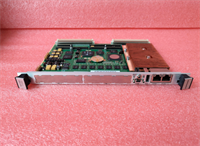
I’ve walked into more control rooms smelling of ozone and panic because a single bad input card took down a turbine trip logic. The EMERSON VME-AD16 isn’t some flashy new gadget; it’s the workhorse that kept American power plants running through the 90s and 2000s. It lives in the Ovation DCS racks, usually buried behind a door covered in dust, quietly converting messy 4-20mA signals from pressure transmitters into clean digital data.Engineers stick with this specific revision because the scan time is brutal—under 2 milliseconds for all 16 points. In a fast-closing valve loop, that speed difference between this and a cheaper generic VME card is the difference between a smooth shutdown and an explosive failure. Sure, the documentation is thick and the firmware versions are picky, but when you need data integrity at 60°C ambient temps, this module doesn’t flinch. Just make sure your grounding scheme is perfect; I’ve seen these throw random noise spikes if the shield isn’t terminated right.
 Quality SOP & Tech Pitfalls (The Reality Check)
 Quality SOP & Tech Pitfalls (The Reality Check)
The Lab Report (SOP)
We don’t just wipe them off and ship them. Every VME-AD16 hits our test bench first.
- Visual & Counterfeit Check: We pop the cover. If the solder joints look reflowed or the chip dates don’t match the era, it gets scrapped.
- Live Rack Test: We slot it into a powered VME backplane with an Ovation controller. We simulate 0%, 50%, and 100% signals on all 16 channels using a Fluke 725 calibrator.
- Noise Floor Analysis: With inputs floating, we measure the noise count. If it jumps more than 2 counts, the isolation is shot.
- Firmware Verification: We read the EPROM version and log it. Mismatched firmware is the #1 cause of “ghost” faults.
- Sealing: It goes into a static-shield bag with desiccant, then a double-walled box. No exceptions.
The Engineer’s Warning (Pitfalls)
Here is where people mess up. I watched a junior tech swap a VME-AD16 last year and spend six hours chasing a “Comm Fail” alarm. He forgot that the old card had a specific termination resistor jumper set for current mode, while the replacement was factory-set for voltage. The result? The controller saw 0 volts instead of 4mA, tripped the low-low alarm, and shut the boiler down.
- Trap 1: Jumper/DIP Switch Blindness. Never assume the new card matches the old one’s hardware config. Take a photo of the jumpers before you pull the old card.
- Trap 2: Ground Loops. These cards are sensitive. If you bond the shield at both ends (field and cabinet), you’ll introduce 60Hz hum that looks like a failing sensor. Bond at one end only.
Installation & Configuration Guide
You have 30 minutes to swap this before the shift change. Move fast, but don’t cut corners.
- Pre-Installation (⚠️ CRITICAL):
- Put the controller in “Maintenance” or “Force” mode to prevent output spikes.
- Take a photo of the existing DIP switches and jumper blocks on the faulty card. Do not rely on memory.
- Discharge static. Touch the rack frame before handling the new module.
- Removal:
- Label every wire if using front terminals. If it’s a rear-termination assembly (RTA), unlatch the RTA carefully.
- Unscrew the faceplate retainers. Pull the card straight out. Don’t wiggle it sideways; you’ll bend the VME pins.
- Installation:
- Match the Jumpers: Immediately set the new VME-AD16 jumpers to match your photo. This step prevents 90% of startup headaches.
- Slide the card in firmly until the rear connector seats. You should feel a solid “thunk.”
- Secure the faceplate screws. Reconnect the RTA or wires.
- Power-On & Testing:
- Restore power. Watch the LEDs. You should see a quick flash of all lights, then the “Run” LED steady green.
- Check the controller software. Verify the raw counts match your simulated input. If Channel 1 reads 3200 instead of 4000, check your jumper settings again.
Compatible Replacement Models
| Compatibility Tier | Model Number | Notes & Differences |
|---|---|---|
| ✅ Drop-in Replacement | EMERSON VME-AD16 (Same Revision) | Exact pinout, firmware, and footprint. Zero code changes. Best option. |
| ⚠️ Software Compatible | EMERSON VME-AD16 (Newer Rev) | Hardware fits, but may require a firmware update in the controller to recognize the new ID. Allow 15 mins extra. |
| ⚠️ Software Compatible | EMERSON CL6721 (Modern Equivalent) | Newer architecture. Fits the slot, but requires logic recompile and potential wiring changes at the RTA. |
| ❌ Hardware Mod Required | Generic VME Analog Cards | Do not attempt. The register mapping is proprietary to Ovation. It will not talk to the CPU. |
Frequently Asked Questions (FAQ)
Q: Can I hot-swap this module while the plant is running?
A: Technically, yes, the VME bus supports it. But honestly? Don’t do it unless you have no choice. Pulling a card can cause a momentary glitch on the backplane that might trip sensitive logic. If you must, force the associated control loops to manual first.Q: My new card shows a red fault light immediately. What gives?
A: 9 times out of 10, it’s a jumper mismatch. You left it in Voltage mode, but your field device is pushing Current. Flip the jumpers. If that fails, the firmware version is too old for your controller revision.Q: Is this truly “New”? I heard Emerson stopped making these years ago.
A: Correct, they are discontinued. When we say “New,” we mean New Surplus—never installed, still in the original anti-static bag from 1998. They are functionally identical to the day they were built, provided the capacitors haven’t dried out (we test for that).Q: How do I handle the 4-20mA vs 0-10V selection?
A: It’s not in the software; it’s physical. Look at the tiny jumpers near the terminal block. Set them for ‘I’ (Current) or ‘V’ (Voltage). If you get this wrong, your readings will be garbage, and you could damage the input circuitry with high voltage.Q: What if I lost the manual for the jumper settings?
A: Don’t guess. Call us, or look at the sticker on the side of the card cage. Better yet, pull the other working cards in the same rack and copy their setup. They should all match for similar loops.Q: Does this come with a warranty?
A: Yes, 1 year. If it dies because of a manufacturing defect (not lightning strikes or wiring errors), we swap it out overnight. We know downtime costs more than the card itself.Q: Can I use this in a non-Ovation VME chassis?
A: Physically, it fits. Logically, it won’t work. The communication protocol is hardcoded for Emerson/Ovation controllers. Save your money and don’t try to hack it into a Siemens or GE rack.