

 Tel:
Tel:  Email:
  WhatsApp:
 Description
Key Technical Specifications
| Parameter | Value |
|---|---|
| Product Model | 701PBKKF |
| Nominal Voltage | 7.2 V |
| Battery Chemistry | Primary Lithium (PBT) |
| Expected Life | Up to 10 years (at 1 min update rate) |
| Physical Interface | Keyed Locking Mechanism (Prevents incorrect installation) |
| Hazardous Area | FM, CSA, ATEX, IECEx Certified (Class I, Div 1/2, Zone 0/1/2) |
| Operating Temperature | -40°C to +85°C |
| Dimensions | 74mm Diameter x 52mm Depth |
| Weight | Approximately 230g |
| Low Voltage Alarm | Yes (Indicates when replacement is needed) |
Product Introduction
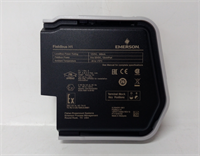
The Emerson 701PBKKF is a specialized power module designed for use with Emerson’s wireless industrial instrumentation, such as pressure, temperature, and level transmitters. It is part of the 701P SmartPower family, engineered to provide a reliable, long-term power solution for remote or difficult-to-access field devices.This module is an intrinsically safe power source, allowing for replacement in hazardous locations without the need to isolate the process. It features a proprietary keyed connection that ensures correct orientation during installation, preventing potential damage to the device. With a predicted operational life of up to a decade under normal conditions, it significantly reduces maintenance costs and downtime associated with frequent battery changes.

Installation & Configuration Guide
Preparation (5 min)
- Verify Compatibility: Confirm the device requiring power is compatible with the 701PBKKF (e.g., Rosemount 3051S, 702, 648, 848T, 2160, or 3308 systems).
- Safety First: Ensure you are in a safe location to perform the work. Although the module is intrinsically safe, standard lockout/tagout procedures should be followed for the host device.
- Gather Tools: No special tools are required; the module uses a standard wrench for the terminal block.
Removal (5 min)
- Access the Housing: Remove the cover of the wireless device to expose the battery compartment.
- Disconnect Terminals: Loosen the terminal screws and disconnect the wires from the old battery module.
- Extract Module: Rotate the old module counter-clockwise to unlock it from the housing, then carefully pull it out.
Installation (5 min)
- Insert New Module: Align the key on the new 701PBKKF with the slot in the device housing.
- Secure Connection: Push the module in and rotate clockwise until it locks into place with a distinct click.
- Reconnect Wiring: Attach the wires to the positive and negative terminals, ensuring they are tight but not over-torqued.
Power-On & Test (10 min)
- Replace Cover: Secure the device cover back onto the housing.
- Network Initialization: If the device is in a wireless network, it may take a few moments to re-establish communication with the gateway. This is normal as the device wakes up.
- Verify Function: Check the device’s status LED or use a handheld communicator to verify that the voltage is stable and the device is reporting data correctly.
Troubleshooting Quick Reference
| Symptom | Probable Cause | Corrective Action |
|---|---|---|
| Device Not Powering On | Dead Battery | The 10-year life has expired. Replace the 701PBKKF module. |
| Low Battery Alarm | End of Life | The “Low Voltage” alarm (typically a flashing LED or status flag) indicates the battery is nearing end of life. Plan a replacement during the next scheduled maintenance. |
| Communication Loss | Loose Connection | Ensure the battery module is fully seated and locked in the housing. The keyed connector must be fully engaged. |
| Erratic Readings | Interference | Verify the device is not being shadowed by a stronger signal source. If the battery is old, a weak signal may also cause intermittent data loss. |
Dimensions, Mounting & Wiring Notes
- Dimensions: The module has a circular profile with a 74mm diameter and a 52mm depth. The compact design allows it to fit in tight spaces.
- Mounting: The module uses a keyed locking mechanism that mates with a corresponding slot in the wireless device housing. It is a “plug-and-play” replacement.
- Wiring: The module connects directly to the device’s internal circuitry via soldered or welded terminals. External wiring is not required for the battery itself, though the device will have field wiring for process connection.
FAQ
1. What is the difference between the Black and Green 701P modules?
The Black 701PBKKF (this model) is designed for pressure transmitters (e.g., 3051S, 702, 3308) and temperature transmitters (e.g., 648, 848T). The Green version (701PGKKF) is designed for use with the 708 wireless ultrasonic level transmitter and 2051 pressure transmitter. The color and keying are different to prevent incorrect installation.2. Can I recharge this battery?
No. This is a primary (non-rechargeable) lithium battery. Attempting to recharge it will cause overheating, leakage, or explosion. If the device stops working, the entire 701PBKKF module must be replaced.3. What is the “SmartPower” feature?
The “SmartPower” feature refers to the module’s ability to communicate its health status (voltage level) to the wireless gateway and host systems. It provides a Low Voltage Alarm that predicts when the battery will need replacement, allowing for proactive maintenance scheduling.4. Is this module really maintenance-free for 10 years?
Yes, under normal operating conditions and with a standard 1-minute update rate, the 701PBKKF is designed to last up to 10 years. However, actual life may vary based on network traffic, signal strength, and environmental factors. The “Low Voltage Alarm” feature helps ensure you are notified before the battery fully depletes.5. What should I do with the old battery?
Dispose of the used battery according to local hazardous waste regulations. The module contains lithium and should not be incinerated, exposed to water, or disassembled.
Emerson 701PBKKF Power Module