
 Tel:
Tel:  Email:
  WhatsApp:
 Description
Key Technical Specifications
| Parameter | Specification |
|---|---|
| Input Voltage Range | 85 to 264 VAC (47–63 Hz) |
| Output Voltage 1 | +24.0 VDC (±5%) @ 4.0 A max |
| Output Voltage 2 | +5.0 VDC (±5%) @ 2.0 A max (Backplane logic) |
| Total Output Power | Approx. 100 Watts combined |
| Hold-up Time | >16 ms at full load (prevents trip on brief dips) |
| Operating Temp | -20°C to +60°C (-4°F to +140°F) |
| Storage Temp | -40°C to +85°C (-40°F to +185°F) |
| Humidity | 5% to 95% Non-condensing |
| Redundancy | Yes (requires two modules in specific slots) |
| Form Factor | 3500 Series Half-Height (4HP) |
| Connector Type | 3500 Backplane I/O (internal) + Terminal Block (external) |
| MTBF | >100,000 hours (typical field data) |
Product Introduction
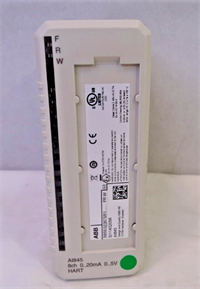
I’ve lost count of how many turbines sat silent because someone tried to run a 3500 rack on a “close enough” power supply that couldn’t handle the inrush current. The Bently Nevada 3500/15-02-02-00 isn’t just a brick; it’s the heartbeat of your vibration monitoring system. Designed specifically for the 3500 chassis, this AC-input module takes the dirty, fluctuating plant power (85-264 VAC) and scrubs it down to the clean 24VDC and 5VDC your proximity probes and logic solvers demand.Engineers stick with this specific revision because it handles brownouts better than the older DC-only versions. In my experience, the hold-up time of 16ms is the difference between a nuisance alarm and a full unit trip during a grid hiccup. It’s bulky, it runs warm (expect 45°C on the faceplate in a closed cabinet), but it rarely fails if you keep the cooling fans working. Just don’t expect it to play nice if your ground loop resistance is above 1 ohm; this thing hates noise.
 Quality SOP & Tech Pitfalls (The Reality Check)
 Quality SOP & Tech Pitfalls (The Reality Check)
The Lab Report (SOP)
Before we ship a 3500/15, we don’t just look at the box. Here is the actual workflow:
- Visual & Counterfeit Check: We inspect the PCB date codes and solder joints under magnification. Fake Bently boards often have blurry silkscreen or cheap terminal blocks that crack when torqued.
- Live Load Test: We mount the unit in a verified 3500 test rack. Using a variable AC source, we ramp from 85V to 264V while loading the 24V rail to 3.5A. We watch for ripple exceeding 50mV p-p.
- Insulation Resistance: A quick Megger check (at low voltage, 250V DC) on the input terminals to ensure no internal shorts from storage humidity.
- Firmware/Config Check: While the 3500/15 doesn’t hold user logic, we verify the internal ID prom reads correctly so the Rack Interface Module recognizes it.
- Sealing: Once passed, it goes straight into an ESD bag with desiccant. No loose cardboard.
The Engineer’s Warning (Pitfalls)
Here is where people get burned. Redundancy wiring is not plug-and-play. I once saw a plant manager install two of these units side-by-side, thinking they were automatically redundant. They weren’t wired to the same AC source, and when the main breaker flipped, both supplies dipped simultaneously because the second one was on the same UPS leg. True redundancy requires diverse AC feeds and specific backplane configuration. Also, never hot-swap this module in a non-redundant rack. The 5V rail will collapse, the rack will reset, and your machinery protection logic will go dark for 3 seconds. That’s enough to trip a compressor.
Installation & Configuration Guide
Time estimate: 30 minutes for a seasoned tech.
- Pre-Installation Safety:
- ⚠️ LOCKOUT/TAGOUT the AC input feed. Verify 0V with a Fluke multimeter.
- Discharge static from your body. Touch the unpainted rack frame before handling the card.
- Take a photo of the existing wiring diagram or the failed module’s terminal connections. Do not rely on memory.
- Removal:
- Remove the external terminal block (if detachable) or loosen the screw terminals carefully. Label every wire (L, N, Earth, DC Out).
- Release the locking tabs at the top and bottom of the module faceplate.
- Slide the module out smoothly. If it sticks, check for bent guide pins—do not force it.
- Installation:
- Critical Step: If replacing one half of a redundant pair, ensure the new module matches the firmware revision of the existing one (check the label). Mismatched revisions can cause “Pair Mismatch” alarms.
- Align the card with the backplane connectors. Push firmly until you hear the click of the rear connector seating.
- Secure the locking tabs. Re-attach wiring. Torque AC terminals to 0.5–0.6 Nm. Over-tightening strips the threads; under-tightening causes arcing.
- Power-On & Testing:
- Apply AC power. Watch the “OK” LED. It should flash during boot, then turn solid green within 5 seconds.
- If you see amber or red, check the rack display for “Power Supply Fault.”
- Measure the output voltage at the terminal block. It must be between 23.5V and 24.5V DC.
- Verify the rack interface module shows no communication errors.

Compatible Replacement Models
| Model Number | Compatibility Tier | Notes & Differences |
|---|---|---|
| 3500/15-02-02-00 | ✅ Drop-in Replacement | Exact match. Same input range, same form factor. |
| 3500/15-02-01-00 | ✅ Drop-in Replacement | Functionally identical. Suffix -01 may indicate minor factory calibration differences, but fits and works the same. |
| 3500/15-01-02-00 | ⚠️ Software Compatible | This is a DC input version (24VDC). DO NOT USE unless you are converting your entire rack power architecture. Requires rewiring. |
| 3500/15-02-XX-XX | ⚠️ Software Compatible | Newer revisions with different suffixes usually work, but verify the “Redundancy” capability code in the datasheet. Some older suffixes don’t support modern high-current monitors. |
Frequently Asked Questions (FAQ)
Q: Can I swap this module while the machine is running?
A: Only if you have a fully redundant system (two power supplies installed and healthy). If you have a single supply, pulling it kills the rack. The machine will trip. Don’t risk it.Q: My new module shows an amber light. Is it defective?
A: Not necessarily. An amber light often means “Standby” in a redundant pair, or it could mean the rack backplane voltage is out of spec. Check the other power supply first. If you only have one module and it’s amber, check your AC input voltage; it might be below 85V.Q: Does this module come with the terminal block?
A: Usually, yes, if it’s New Surplus. But warehouses sometimes separate them. Check the photos. If the block is missing, you’ll need to order the specific 3500 terminal block separately, or cannibalize one from the old unit (if it’s not damaged).Q: How long does the “hold-up” last if power flickers?
A: About 16 milliseconds at full load. That’s enough to ride through most contactor transfers, but not a generator failure. If your plant has dirty power, I highly recommend installing a dedicated UPS upstream of the rack.Q: Can I use a 3500/15-01 (DC version) if I have a 24VDC supply?
A: Technically, yes, the rack runs on 24VDC internally. But the 3500/15-02 (AC version) has a built-in rectifier and wider tolerance. If you already have a clean 24VDC plant supply, the DC version (-01) is actually more efficient. Just don’t feed 120VAC into a DC-input card, or you’ll let the magic smoke out instantly.Q: What is the warranty on these surplus units?
A: We offer a 1-year replacement warranty. These are discontinued by the OEM, so “repair” isn’t really an option anymore. If it fails, we swap it. Keep your purchase order; you’ll need it.