
 Tel:
Tel:  Email:
  WhatsApp:
 Description
Key Technical Specifications
- Compatible Controllers: ABB S4C, S4C Plus (M2000 early variants may differ).
- Function Code: System Memory & Parameter Storage.
- Voltage Input: 5V DC (supplied via backplane from main power supply unit).
- Memory Type: Volatile SRAM with battery backup or Non-volatile Flash (depending on specific revision suffix).
- Data Retention: Requires functional onboard battery (if SRAM type) to hold programs during power off.
- Communication Interface: Internal DuBus (ABB proprietary backplane bus).
- LED Indicators: Status LEDs for Power, Battery Low, Memory Error, and CPU Activity.
- Operating Temperature: 0°C to +55°C (32°F to 131°F). Derate above 45°C.
- Storage Temperature: -25°C to +70°C.
- Humidity: 5% to 95% non-condensing.
- Mounting: DIN-rail or specific slot in ABB S4C cabinet (Slot dependent on configuration).
- Dimensions: Approx. 160mm x 100mm x 40mm (Standard Eurocard form factor variant).
Product Introduction
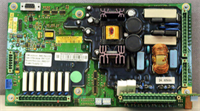
If you’ve ever stood in front of an ABB S4C cabinet with a blinking red “Memory Fault” light while production is down, you know the panic this board causes. The DSQC 227 (YB560103-BK) isn’t just a circuit board; it’s the brain’s hippocampus for thousands of older ABB robots still welding car frames and palletizing boxes worldwide. When this card fails, the controller forgets who it is. No coordinates, no payloads, no programs. Just a brick.I’ve swapped dozens of these over the years. The “-BK” suffix is critical—it denotes a specific hardware revision that handles memory addressing differently than the earlier “-BG” or “-BJ” versions. Stick to the exact suffix. The real value of this module is its durability; I’ve seen them run for 15 years in hot foundries without a hiccup. However, they are notoriously sensitive to battery failure. If the backup battery dies while the main power is off, you lose everything. It’s a simple design, but don’t let that fool you. Without this specific card, your $100k robot is scrap metal.
 Quality SOP & Tech Pitfalls (The Reality Check)
 Quality SOP & Tech Pitfalls (The Reality Check)
The Lab Report (SOP)
We don’t trust “plug and play” with legacy ABB gear. Here is how we validate every DSQC 227 before it ships:
- Visual Inspection: We check for capacitor leakage (the #1 killer of old ABB boards) and corrosion on the DuBus connectors. We verify the “YB560103-BK” label matches the PCB silk screen.
- Battery Voltage Check: If the unit uses a battery-backed SRAM, we measure the onboard battery voltage under load. Anything below 3.2V gets replaced immediately. A weak battery means data loss the moment you pull the plug.
- Backplane Live Test: We install the card into a verified S4C test rack. We boot the controller to the “Ready” state and verify the system recognizes the memory size correctly.
- Read/Write Cycle: We write a dummy system parameter, power cycle the unit five times, and read it back. If the data corrupts, the memory chip is toast.
- ESD Packaging: Once passed, it goes into a silver static-shield bag with desiccant. Old CMOS chips hate static.
The Engineer’s Warning (Pitfalls)
Here is the nightmare scenario I see too often: An engineer swaps a dead DSQC 227 with a “good” spare, powers up, and the robot boots… but all the programs are gone. Why? Because the new card was wiped, or the battery was dead, and they didn’t have a backup. Rule #1: Never swap this card without a current BACKUP directory on a floppy, zip disk, or network drive. Also, watch out for the “Battery Low” alarm. If you see that alarm, you have maybe 24 hours before data loss. Don’t ignore it. Another trap: mixing revisions. Putting a DSQC 227 -BL into a system expecting -BK might physically fit, but the firmware won’t recognize the memory map, causing a constant reboot loop. Match the suffix exactly.
Installation & Configuration Guide
Replacing the DSQC 227 is high-stakes. One slip and you wipe the robot’s identity. Follow this rigid protocol.
- Pre-Installation Safety: ⚠️ Create a Full System Backup. Connect to the teach pendant or service port and save the entire system to external media. If you can’t boot, try to pull the memory card (if accessible) and image it. Turn off the main disconnect switch. Wait 2 minutes for the capacitors in the power supply to discharge.
- Removal: Open the S4C cabinet. Locate the DSQC 227 (usually near the CPU or memory bank). Take a photo of the jumper settings and DIP switches (if present). Unplug the ribbon cables carefully—do not pull by the wires. Unscrew the mounting bracket and slide the card out.
- Configuration Transfer: CRITICAL. Compare the jumper settings on the old card vs. the new DSQC 227 YB560103-BK. ABB often shipped these with default jumpers that must be changed for your specific robot model (e.g., IRB 2400 vs. IRB 6400). Copy the old settings exactly. Replace the onboard battery on the new card if it’s been sitting on a shelf for more than a year.
- Installation: Slide the new card into the slot firmly until the backplane connector seats. Secure the mounting screws. Reconnect the ribbon cables, ensuring Pin 1 aligns correctly (red stripe on cable to Pin 1 on board).
- Power-On & Testing: Turn on the main power. Watch the LEDs. You should see a green “Power” LED and a flashing “Activity” LED. If the “Battery” LED is red, replace the battery immediately. Boot the controller. If it asks to “Load System,” point it to your backup. Verify the robot moves in manual mode at low speed before resuming production.
 Compatible Replacement Models
 Compatible Replacement Models
| Compatibility Tier | Model / Description | Notes & Differences |
|---|---|---|
| ✅ Drop-in Replacement | ABB DSQC 227 YB560103-BK | Exact match. Guaranteed compatibility with S4C systems originally equipped with this revision. |
| ✅ Drop-in Replacement | ABB DSQC 227 YB560103-BL | Newer revision. Often backward compatible, but requires checking jumper settings and potentially updating the base system software. Use only if BK is unavailable. |
| ⚠️ Software Compatible | ABB DSQC 227 (Other Suffixes) | Hardware is identical, but memory mapping or battery circuits may differ. Requires full system restore from backup and potential parameter re-entry. High risk of boot failure if mismatched. |
| ❌ Hardware Mod Required | DSQC 23x / 24x Series | Different form factor or bus interface. Will not fit in the S4C slot without major cabinet rewiring and backplane changes. Not recommended. |
| ❌ Hardware Mod Required | IRC5 / OmniCore Controllers | Completely different architecture. You cannot upgrade an S4C to IRC5 by swapping cards; it requires a full controller replacement. |
Frequently Asked Questions (FAQ)
Q: My robot says “Memory Battery Low.” Do I need to replace the whole DSQC 227 board?
A: Not necessarily. Often, just the onboard coin-cell battery (usually a CR2032 or similar industrial grade) is dead. If the board is otherwise healthy, you can swap the battery while the robot is powered on to retain data. However, if the board is old (15+ years), the capacitor holding the charge might be failed too. If you aren’t comfortable working live inside a cabinet, swap the whole card—but ONLY after making a backup.Q: Can I use a DSQC 227 from an IRB 2400 in an IRB 6400?
A: Yes, the hardware is generally the same across the S4C family. The difference lies in the system parameters stored on it, not the card itself. As long as the suffix (YB560103-BK) matches, the physical card works. You will need to load the specific system backup for the IRB 6400 onto it to make the robot function correctly.Q: The LED on the new card is solid red. What does that mean?
A: Solid red usually indicates a hardware fault or a severe memory checksum error. First, check your jumper settings—they are likely wrong. Second, ensure the card is fully seated in the backplane. If jumpers are correct and it’s seated tight, the surplus card you bought might be DOA (Dead on Arrival). Contact your supplier immediately.Q: Is there a modern equivalent for this board?
A: No. The S4C controller is obsolete. ABB has moved to IRC5 and now OmniCore. There is no direct “upgrade” card that puts S4C features into a new controller. If this board fails repeatedly, it’s a sign you should plan a full controller migration project, not just keep swapping spares.Q: How long will the battery last once I install a new DSQC 227?
A: A fresh industrial battery in a healthy circuit should last 3 to 5 years. However, if the board’s leakage current is high due to age, it might drain in 6 months. Monitor the “Battery Low” alarm regularly. I recommend scheduling a battery change every 2 years as preventive maintenance, regardless of the alarm.Q: Do you provide the system software to load onto this card?
A: No. The DSQC 227 is hardware only. You must provide your own system backup (RobotWare version specific to your cell). We test the hardware to ensure it can hold data, but we do not have your specific robot’s calibration or program files. Always keep multiple backups off-site.