
 Tel:
Tel:  Email:
  WhatsApp:
 Description
Key Technical Specifications
| Parameter | Specification | Notes |
|---|---|---|
| Axes Supported | 6 Axes | Full robot control capability |
| Processor Type | Proprietary DSP/Microcontroller | Optimized for motion kinematics |
| Logic Voltage | 24 V DC ±10% | Critical tolerance range |
| Power Consumption | Approx. 25 W | Depends on axis load |
| Communication Interface | Serial Backplane Bus | High-speed link to main CPU |
| Resolver Feedback | 6 Channels | Direct connection to motor resolvers |
| Operating Temp | 0°C to +55°C | Derate above 45°C |
| Storage Temp | -25°C to +70°C | Avoid humidity condensation |
| Dimensions | 280 x 160 x 40 mm | Standard ABB rack slot size |
| Weight | ~0.9 kg | Includes metal housing and heatsink |
| Protection Class | IP20 | Indoor use only |
| Mounting | DIN Rail or Chassis Slot | Specific to S4C/IRC5 cabinets |
Product Introduction
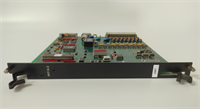
If you’ve ever stood in front of an ABB S4C controller watching a “Axis Computer Fault” alarm flash red, you know the panic it causes. The production line stops, the robots freeze mid-weld, and everyone stares at the DSQC 223 (YB560103-BD). This isn’t just some generic I/O card; it’s the brain that calculates the trajectory for every joint in real-time. I’ve replaced dozens of these in automotive plants where the air is thick with zinc oxide dust, and frankly, the build quality is tank-like. The heavy aluminum heatsink isn’t for show; it dissipates the heat generated by constant trigonometric calculations.Engineers stick with this specific revision (YB560103-BD) because later versions sometimes have different firmware dependencies that break old RAPID programs. This board handles resolver signals with incredible precision, maintaining position accuracy within 0.05mm even after years of vibration. However, don’t let the rugged look fool you. The backplane connectors on these older units are sensitive to oxidation. If the robot has been sitting idle for months, expect contact resistance issues until you seat the card a few times. But once it’s running, it’s bulletproof.
 Quality SOP & Tech Pitfalls (The Reality Check)
 Quality SOP & Tech Pitfalls (The Reality Check)
The Lab Report (SOP)
We treat these motion boards with extreme care. Our testing protocol starts with a microscopic inspection of the backplane pins to ensure no bending or corrosion. Then, we install the DSQC 223 into a live S4C test cabinet connected to a dummy load motor simulator. We run a continuous circular interpolation program for 6 hours, monitoring the resolver feedback loop for any jitter or dropout. Using a Fluke 87V, we verify the 24V input stability under load and check for short circuits on the output drivers. Finally, we read the firmware ID from the onboard memory and seal the unit in anti-static shielding with a desiccant pack. You receive a test log showing zero errors during the simulation.The Engineer’s Warning (Pitfalls)
Here is the mistake that kills these boards: hot-swapping without discharging the servo drives. The DSQC 223 talks directly to the servo amplifiers. If you pull this card while the drives are energized, the voltage spike can fry the communication transceivers instantly. I saw a technician do this once; he swapped the board, powered up, and smelled burning silicon immediately. The new board was dead on arrival because he didn’t wait for the DC bus capacitors to discharge. Also, check your resolver cables. A broken shield on the feedback cable introduces noise that looks exactly like a faulty DSQC 223. Don’t blame the card until you’ve verified the cabling integrity.
Installation & Configuration Guide
Replacing an axis computer requires precision. Follow these steps to avoid frying the new hardware.
- Pre-Installation: ⚠️ Power down the entire robot controller. Wait at least 5 minutes for the servo drive capacitors to discharge (verify with a multimeter). Take photos of all cable connections and jumper settings on the old board.
- Removal: Label every resolver and power cable connected to the front. Unscrew the mounting brackets carefully. Pull the old DSQC 223 straight out, avoiding any side-to-side wiggling that could damage the backplane.
- Installation: Inspect the new board’s connectors for debris. Ensure no jumpers need moving (usually factory set, but verify against your photo). Align the card with the slot and push firmly until it seats flush. Secure the mounting screws tightly to ensure good grounding through the chassis.
- Power-On & Testing: Reconnect all resolver and communication cables. Double-check polarity on the 24V supply. Power up the controller. Watch the LED status: the “Ready” light should turn green after the boot sequence. If the “Fault” LED blinks, check the error code on the teach pendant. Run a slow manual jog of each axis to verify movement and feedback.
Compatible Replacement Models
| Compatibility Tier | Model Number | Details & Differences |
|---|---|---|
| ✅ Drop-in Replacement | DSQC 223 YB560103-BD | Exact match. Same firmware baseline. No parameter changes needed. Best for minimal downtime. |
| ⚠️ Software Compatible | DSQC 223 YB560103-BC | Earlier revision. Hardware fits, but may require a system calibration or parameter reload from backup. |
| ❌ Hardware Mod Required | DSQC 3HAC Series | Newer generation for IRC5. Different form factor and communication protocol. Requires full cabinet upgrade. |
Frequently Asked Questions (FAQ)
Q: Can I replace this board without losing my robot calibration?
A: Yes, the calibration data is stored in the main CPU or on the serial measurement board, not on the DSQC 223 itself. However, always have a backup of your system parameters before touching anything.Q: How do I know if the fault is this board or the servo motor?
A: If the error follows the board when you swap it to a different axis slot, it’s the board. If the error stays with the specific axis regardless of which board controls it, check the motor resolver and cables first.Q: Is this unit refurbished or new surplus?
A: We supply New Surplus units. These are original ABB parts that were purchased as spares years ago and never used. They come in original factory packaging. We test them, but they haven’t been rebuilt with aftermarket parts.Q: What if the “Ready” light doesn’t come on after installation?
A: Check the 24V supply first. If power is good, reseat the board firmly; oxidized contacts are common on older racks. If it still fails, the backplane slot might be dirty or damaged. Try a different slot if your configuration allows.Q: Does this support external axes (positioners)?
A: Yes, the DSQC 223 can manage external axes if configured in the system parameters. You just need to assign the axis numbers correctly in the motion task configuration.Q: How long does shipping take if you don’t have it locally?
A: Since this is obsolete, inventory moves fast. If we don’t have it in our local warehouse, we can source it from our global network in 3-5 days. For urgent breakdowns, call us; we might have one reserved for emergency dispatch.Q: Can I update the firmware on this board myself?
A: Generally, no. The firmware is tied to the specific controller generation (S4C). Updating it incorrectly can brick the board. Stick to the version that matches your current system software unless you are performing a controlled upgrade with ABB support tools.