 Tel:
Tel:  Email:
  WhatsApp:
 Description
Key Technical Specifications
| Parameter | Specification | Notes |
|---|---|---|
| Processor | Intel Atom / Custom ASIC | High-speed deterministic processing |
| Cycle Time | < 1 ms | Typical for motion control tasks |
| Memory | 512 MB RAM / 1 GB Flash | Stores logic, parameters, and diagnostics |
| Communication | SERCOS III, EtherCAT, Ethernet/IP | Real-time fieldbus support |
| I/O Capacity | Up to 256 Axes (via bus) | Depends on network topology |
| Operating Temp | -20°C to +60°C | Derate above 50°C without forced air |
| Power Supply | 24 VDC ±20% | Via backplane or terminal block |
| Power Consumption | ~15 Watts | Typical load |
| Dimensions | Standard AC 800PEC Form Factor | Fits HIU800 chassis |
| Certifications | CE, UL, CSA | Industrial safety standards |
| Firmware Version | Specific to R0007 suffix | Critical for compatibility |
| Battery Backup | Yes (SuperCap or Li-Ion) | Retains RAM data during power loss |
Product Introduction
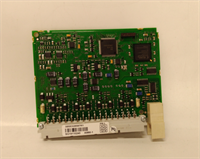
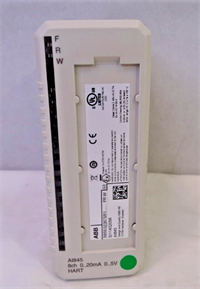
If you’ve ever watched a 50-ton wind turbine blade miss its pitch angle by half a degree because a controller lagged, you know why the ABB 3BHE030579R0007 exists. This isn’t your standard PLC that scans logic every 20 milliseconds. This is a hard real-time beast designed for the AC 800PEC platform, handling kinematics calculations faster than most desktop PCs. I’ve seen these units keep robotic arms synchronized within microns while welding car frames at full speed. When this module fails, the whole cell stops. No workaround, no bypass.Engineers hunt for the R0007 suffix specifically because it locks in a specific firmware baseline that plays nice with older servo drives and legacy HMI panels. Newer revisions often break backward compatibility with old motion libraries, forcing a complete code rewrite—a nightmare no one wants during a scheduled outage. The unit is rock solid if you keep it cool. I’ve pulled these out of cabinets hitting 70°C where the thermal paste had turned to dust, causing random reboots. Clean the heatsink, check the fans, and this thing will run for another decade. But ignore the cooling, and it’ll brick itself before lunch.
 Quality SOP & Tech Pitfalls (The Reality Check)
 Quality SOP & Tech Pitfalls (The Reality Check)
The Lab Report (SOP)
You can’t test a motion controller with just a multimeter. You need to talk to it.
- Visual & Counterfeit Check: We inspect the PCB for “refurbished” signs—mismatched component dates, sloppy reflow solder on the BGA processor, or stickers covering original serial numbers.
- Boot & Handshake Test: We power the unit in a test rack and attempt to connect via ABB’s Control Builder or PC Tool software. If it doesn’t handshake within 30 seconds, the bootloader is corrupted.
- Memory Integrity Check: We run a read/write stress test on the flash and RAM. Bad memory sectors cause “Task Watchdog” errors later in the field.
- Communication Stress: We simulate traffic on SERCOS III and EtherCAT ports, flooding the buffer to ensure the real-time kernel doesn’t drop packets. Dropped packets mean jerky robot motion.
- Thermal Runaway Test: We run the CPU at 100% load in a heated chamber (55°C) for 4 hours. If it throttles or resets, the thermal interface material is shot, and we re-paste it before shipping.
The Engineer’s Warning (Pitfalls)
The silent killer here is Firmware Mismatch.
Field Disaster: A automotive plant upgraded a failed 3BHE030579R0007 with a “newer” unit they bought online (different suffix). The hardware fit, the lights came on, but the robot wouldn’t move. The new unit had a firmware version that didn’t recognize the old axis configuration files. The error log just said “Configuration Invalid.” They spent 14 hours trying to debug the logic before realizing the CPU itself was incompatible. They had to source an exact R0007 match.
Also, never pull the battery/supercap without backing up the RAM image first. Some configurations store dynamic parameters (like tool offsets) in volatile memory backed by that tiny battery. If it dies during a swap, you lose your zero points. Always backup to a PC before pulling the plug.
Installation & Configuration Guide
Time Estimate: 45 Minutes (Includes software verification)
- Pre-Installation Safety ⚠️
- Lockout/Tagout (LOTO) the main control power.
- CRITICAL: Connect a laptop running ABB Control Builder/PC Tool and perform a full “Upload” of the current project and parameters. Save it locally. Do not trust the existing backup on the server; it might be outdated.
- Photograph all cable connections, especially the fiber optic SERCOS rings. One swapped fiber breaks the whole ring.
- Removal
- Disconnect the Ethernet and Fieldbus cables. Label them (Port A, Port B, Service Port).
- Unscrew the mounting brackets or release the DIN rail clips.
- Slide the module out. Be careful with the connector pins on the backplane; they bend easily.
- Installation
- Insert the replacement 3BHE030579R0007. Ensure it seats firmly against the backplane.
- Secure the mounting hardware.
- Reconnect cables exactly as labeled. Double-check fiber orientation; transmitting into a receiving port is mandatory.
- Battery Check: If the unit has a replaceable battery, verify its voltage (>3.0V) before closing up. If it’s a supercap, give it 10 minutes to charge after power-up.
- Power-On & Testing
- Apply power. Watch the LED sequence. It should go from Red (Boot) to Flashing Green (Loading) to Solid Green (Run).
- Connect your laptop. Download the saved project file to the new CPU.
- Verify Firmware: Check the system info in the software. Does the firmware version match the old unit? If not, you may need to flash the older version (risky) or update the entire system (time-consuming).
- Perform a “Dry Run”: Enable the drives in “Safe Mode” (no motion) and verify communication status words are healthy.
- Jog each axis slowly to confirm command tracking.
Compatible Replacement Models
| Compatibility Tier | Model Number | Details & Constraints |
|---|---|---|
| ✅ Drop-in Replacement | 3BHE030579R0007 | Exact match. Guaranteed compatibility with existing logic and firmware. Highest cost due to scarcity. |
| ⚠️ Software Compatible | 3BHE030579R0008 / R0009 | Newer hardware revision. Physically identical. May require firmware downgrade or project recompilation to work with old code. Labor: 1-2 hours for engineering support. |
| ⚠️ Firmware Dependent | 3BHE030579R00xx (Other) | Different stock firmware. Requires full system re-commissioning and potential license transfer. Not recommended for emergency fixes. |
| ❌ Hardware Mod Required | AC 800M (Standard) | Different architecture. Cannot replace PEC (Motion) with standard M (Logic) without redesigning the entire motion control layer and replacing drives. |
Frequently Asked Questions (FAQ)
Q: Can I swap this module while the machine is running?
A: Absolutely not. This is the central motion controller. Pulling it cuts the heartbeat to all servo drives. The axes will coast to a stop (or fault immediately), likely causing a crash or a product quality disaster. Plan a full shutdown.Q: The LED is flashing red/green alternately. What does that mean?
A: That’s usually a “Boot Failure” or “No Valid Application” code. It means the CPU can’t find a valid program to run in its flash memory. This happens if the memory got corrupted or if you installed a blank unit and haven’t downloaded the project yet. Check your comms and try downloading the backup.Q: Is the R0007 suffix really that critical? Can I use R0001?
A: Yes, it’s critical. The suffix often denotes the pre-loaded firmware version and hardware calibration data. An R0001 might be too old to support the specific fieldbus protocols your newer drives use, or too new to understand your old logic. Stick to the exact suffix unless you have an ABB engineer ready to migrate your entire codebase.Q: How long does the battery last, and what happens if it dies?
A: The internal battery (or supercap) typically lasts 3-5 years. If it dies while powered, nothing happens. If it dies while unpowered, you lose RAM data (dynamic parameters, current position if not absolute encoded). The program in Flash is safe. Replace the battery proactively every 4 years during preventive maintenance.Q: Why is the lead time so long for new ones?
A: ABB has moved on to newer platforms (like the AC 500-xC series or updated PEC versions). The 3BHE030579R0007 is legacy. Manufacturing lines for these specific boards stopped years ago. The only supply left is global surplus stock, which is why prices jump when a major supplier dumps their inventory.Q: Do I need a special license to run this?
A: Often, yes. Motion control features (camming, gearing, robotics kinematics) usually require specific license keys stored in the CPU or a dongle. If you swap the CPU, you might need to transfer these licenses using the ABB License Manager. If you lose the license key file, you’re buying a new software package. Check your license documentation before starting the swap.